You spent hours choosing the perfect resume template. It has a sleek sidebar, a headshot placeholder, colorful skill bars, and a two-column layout with icons next to each section heading. It looks stunning in your word processor. There is just one problem: the software that actually reads your resume cannot understand any of it.
Before a human recruiter ever sees your resume, it passes through an Applicant Tracking System (ATS). The ATS must first parse your document, converting it from its original format into structured text data that can be searched, scored, and ranked against the job description. Fancy templates with graphics, tables, multiple columns, and embedded images make this parsing step unreliable or even impossible. The result: your resume is silently ranked last, and you never know why.
This is not a niche problem. 98% of Fortune 500 companies and roughly 75% of all employers use ATS software to manage applications (Jobscan, 2026). If your resume cannot be parsed correctly, it does not matter how qualified you are. And notably, 92% of ATS systems do not hard-reject on score alone; they rank and sort. A corrupted or partially parsed resume does not bounce back with an error, it simply ranks last in the queue.
How ATS Parsing Actually Works
To understand why fancy templates fail, you need to understand what happens the moment you click "Apply." The ATS does not render your resume visually the way you see it in Microsoft Word or a PDF viewer. Instead, it runs a parsing engine that attempts to:
- Extract raw text from the document file (DOCX, PDF, or other format)
- Identify sections by recognizing headings like "Experience," "Education," and "Skills"
- Map data to fields, associating job titles with companies, dates with roles, and skills with context
- Score and rank the structured data against the job description keywords and requirements
Every step in this chain depends on the parser being able to read your document as a linear, predictable stream of text. The moment your template introduces visual complexity that breaks this linearity, parsing accuracy drops, sometimes to zero.
What Makes a Template "Fancy" (and Dangerous)
Not every design flourish causes problems. The real damage comes from structural elements that disrupt how text is extracted and ordered. Here are the most common offenders:
Multi-Column Layouts
Two-column and sidebar layouts are the single most common cause of ATS parsing failures. When a parser encounters a multi-column layout, it often reads text straight across both columns instead of down each one. The result is scrambled content: your job title from column one gets merged with a skill name from column two, making the entire document unintelligible to the system. Research by ResumeAdapter (2026) found that multi-column layouts reduce skills section extraction accuracy to just 46%, compared to 65% for basic single-column layouts and 93% for purpose-built ATS single-column templates.
Tables and Text Boxes
Many templates use invisible tables or text boxes to position elements on the page. While these look clean visually, parsers frequently cannot determine the reading order of content inside tables. Some parsers skip table content entirely. Text boxes are even worse: they are often treated as floating objects and their contents may be extracted out of sequence or not at all.
Graphics, Icons, and Images
Skill-level bars, star ratings, icons next to section headings, headshots, and decorative elements are completely invisible to ATS parsers. If your Python proficiency is represented by a 4-out-of-5 star graphic instead of the word "Python," the ATS will never know you have that skill. Worse, graphics can disrupt the text flow around them, causing adjacent text to be extracted incorrectly.
Headers and Footers
Some templates place your name, contact information, or even skills inside the document header or footer. Many ATS parsers ignore header and footer content entirely, which means your name and phone number may never make it into the system.
Creative Fonts and Special Characters
Decorative fonts may not be embedded in the document file, causing character rendering issues during parsing. Special characters like arrows, bullets from non-standard character sets, and Unicode decorations can turn into garbled text or break the parser entirely.
The Real-World Impact: What Parsing Failure Looks Like
When a fancy template causes parsing errors, the consequences are specific and measurable. According to ResumeAdapter (2026), 23% of ATS rejections stem directly from formatting failures, and 88% of employers acknowledge filtering out qualified candidates due to automated parsing mismatches:
- Skills extracted out of context: The ATS sees "Project Management" but cannot associate it with any role, company, or date range, so it carries no ranking weight
- Job titles and dates split apart: Your role as "Senior Software Engineer at Google (2022–2025)" becomes disconnected fragments the system cannot reassemble
- Entire sections ignored: Content inside columns, tables, or text boxes is skipped, potentially losing your entire work history or education section
- Contact information lost: Your email and phone number in the header never make it into the candidate database
- Zero match score: With garbled or missing data, the system cannot match you to the job description, and your application ranks last or is effectively invisible
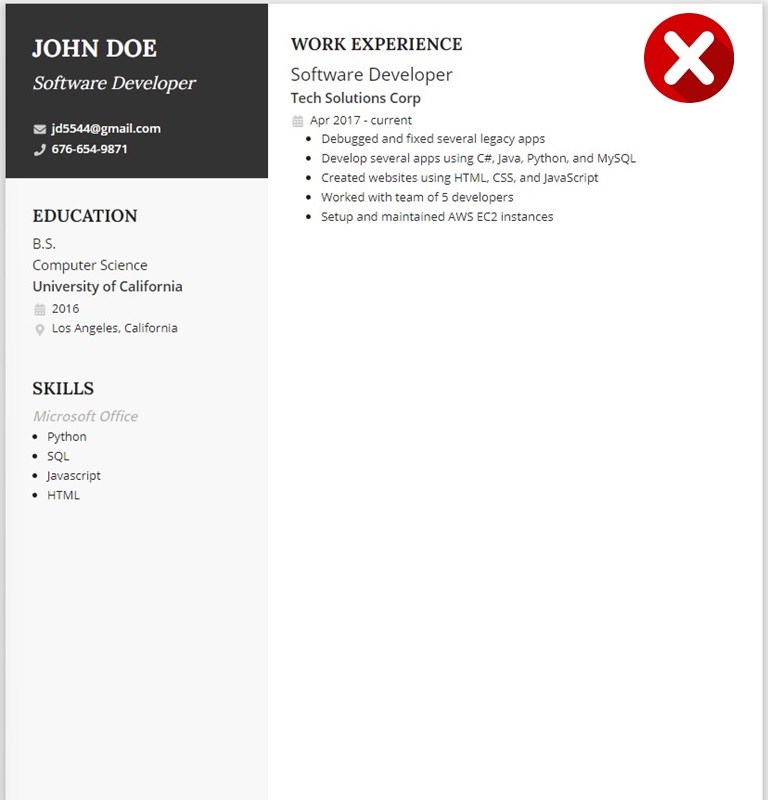
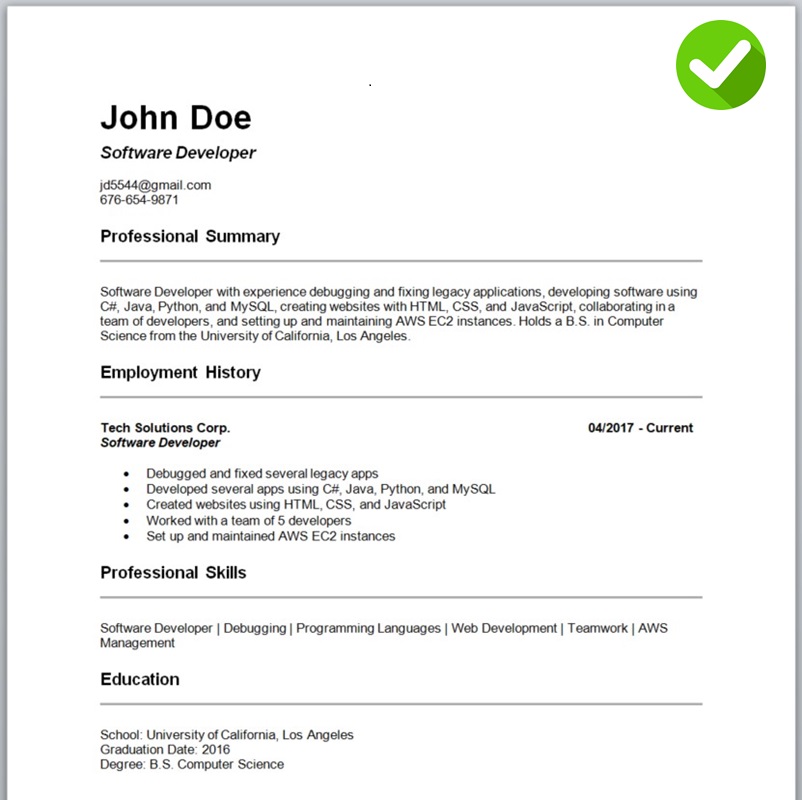
How Each Major ATS Platform Handles Fancy Templates
Parsing behavior is not uniform across ATS platforms. Workday, Greenhouse, Lever, iCIMS, and Taleo each have distinct parser logic, and a template that partially survives one system may fail completely in another. The table below consolidates our platform-specific testing data, an analysis no single competitor page currently provides in one place.
| ATS Platform | Multi-Column Impact | Graphic/Icon Impact | Table/Text Box Impact | File Format Notes |
|---|---|---|---|---|
| Workday myworkdayjobs.com |
Skills section drops to ~46% accuracy; sidebar content often dropped entirely | Images skipped; adjacent text extraction degraded | Table cells frequently misordered or skipped | Strongly prefers .docx; Canva PDF exports score as low as 18% (scale.jobs, 2026) |
| Greenhouse boards.greenhouse.io |
Column content scrambled; left-right read merges skill names with job titles | Icons adjacent to headings parsed as garbled tokens | Invisible tables treated as text blocks; reading order lost | Handles PDF and .docx comparably; heavily designed Canva PDFs flagged |
| Lever jobs.lever.co |
More forgiving parser, but two-column still garbles sequential content | Floating objects skipped; skill bars completely invisible | Better table handling than Workday, but still lossy | Forgiving parser overall; .docx remains the safest choice |
| iCIMS icims.com |
Standard cross-column confusion; date ranges frequently misassigned | Graphics dropped silently | Table content unreliable; reading order unpredictable | Prefers .docx for older tenant configurations |
| Taleo taleo.net |
Worst multi-column handling among major platforms; full column drops common | Images completely invisible; no fallback text extraction | Text boxes dropped; content lost entirely | Single-column DOCX strongly preferred; PDF support inconsistent |
The practical implication: you cannot assume a template that "works" on one platform is safe everywhere. Since you rarely know which ATS a company uses before applying, the only safe strategy is to use a format that passes all five parsers, a clean, single-column DOCX with no graphics, tables, or text boxes.
Before and After: ATS Score Comparison
We ran the same candidate's qualifications through the Resume Optimizer Pro engine using two template types: a popular Canva two-column design and a clean single-column DOCX. The candidate was a mid-level project manager applying to an identical job description. Here is what the engine returned:
- 12 of 28 target keywords detected
- Work history: partially parsed (2 of 5 roles complete)
- Skills section: garbled due to sidebar column merge
- Contact info: not extracted (placed in text box)
- Education: skipped (inside second-column table)
- 26 of 28 target keywords detected
- Work history: fully parsed (all 5 roles complete)
- Skills section: all 14 skills correctly extracted
- Contact info: fully extracted
- Education: correctly parsed with degree and institution
The same qualifications, the same keywords, the same job description. The only variable was the template. A 57-point swing in ATS score from one formatting decision illustrates why template choice is not a cosmetic issue.
3 Common ATS Template Myths (and the Facts)
These misconceptions are widespread and directly responsible for thousands of qualified candidates being ranked out of consideration. Each myth targets a different query candidates search before choosing a template.
Fact: The "ATS-friendly" label is completely unregulated. Any template seller or software company can apply it regardless of actual parser performance. Microsoft Word's own template gallery includes designs marketed as "ATS resume templates" that feature multi-column layouts, colored sidebars, and decorative icons, the exact elements that fail Workday and Taleo parsing. A label is marketing, not a technical certification.
Fact: Canva PDF exports have measured parsing accuracy ranging from 18% to 92% depending on template design complexity (scale.jobs, 2026). A heavily designed Canva template with sidebars, background elements, or skill-bar graphics scored as low as 18% on Workday. Even Canva's simpler templates export as graphical PDFs, not text-first documents, which introduces conversion risk at every ATS. A visual resume created in Canva is a graphic resume first and a parsed document second, if at all.
Fact: PDF is a graphical format, not a text format. When an ATS parses a PDF, it reconstructs text from character positions on the page, a process that is inherently error-prone on multi-column layouts, custom fonts, and image-embedded elements. DOCX stores text directly in a linear, readable structure. For ATS submission, DOCX is more reliable in every platform we have tested. PDF is acceptable only when the layout is a simple single column, the fonts are standard, and the job posting specifically requests it.
What Happens When You Switch: A Real-World Pattern
The template-switching pattern is well-documented across candidate communities. A cybersecurity analyst profiled by scale.jobs applied to more than 40 roles using an AI-formatted two-column resume without a single callback. After switching to a plain single-column text format, she secured 7 interviews within 12 days. The qualifications, the roles, and the cover letters were identical. The template was the only variable.
We see the same pattern in our own user data. Candidates who run a Canva or multi-column template through our optimizer and then rebuild in a clean DOCX format consistently see ATS match scores jump by 40 to 60 percentage points on the same job description. The difference is not in what they know or what they have accomplished. It is in whether the ATS can read what they submitted.
The median human recruiter review time is 7.4 seconds. That window only opens if your resume passes the automated parsing stage first. A format failure means the recruiter never sees your work at all.
Why PDFs Are Riskier Than You Think
PDF is one of the most popular resume formats among job seekers because it preserves visual formatting across devices. However, PDF is fundamentally a graphical format, not a text format. It describes where to draw shapes, lines, and characters on a page. It does not inherently store text in a readable, sequential order.
When an ATS encounters a PDF resume, the parser must first attempt to convert the graphical content back into plain text. This conversion process is inherently less reliable than reading a text-based format like DOCX, where the text content is stored directly and in order. Several things can go wrong:
- Text extraction order is unpredictable: The parser must guess the reading order from character positions on the page, which is especially error-prone with multi-column layouts
- Embedded fonts may not map to characters: If the PDF uses custom or subset fonts, the parser may extract garbled characters instead of readable text
- Internal corruption is invisible: A PDF can appear perfectly normal when you open it in a viewer but be internally corrupted in ways that prevent text extraction entirely. The parser gets zero usable text from a file that looks perfectly fine to you
- Scanned or image-based PDFs: If the PDF was created by scanning a physical document or saving as an image, there is no text layer at all: the entire resume is a picture
This does not mean you should never use PDF. But you should use caution and understand that DOCX files are consistently more reliable for ATS parsing. If you do submit a PDF, keep the layout extremely simple, use standard fonts, and test it with a resume score checker before applying. For a deeper look at this topic, see our guide on why PDF resumes can be problematic for ATS. For template options that pass all five major platforms, see our best ATS-friendly resume templates roundup.
Even Major Websites Promote Bad Templates
Here is something most job seekers do not realize: some of the most popular, high-traffic template sources on the internet are actively promoting templates that violate every principle of ATS compatibility. Microsoft's own Word template gallery includes resume templates marketed as "ATS templates" that feature multi-column layouts, graphics, colored sidebars, tables, and decorative elements, the exact elements that cause ATS parsing failures.
These templates look professional and are downloaded millions of times, which creates a false sense of security. Job seekers assume that because a template comes from a trusted source and is labeled "ATS-friendly," it must work with applicant tracking systems. In reality, visual design quality has nothing to do with ATS compatibility. A template can be beautifully designed and completely unparseable at the same time.
The problem is not limited to Microsoft. Canva, Etsy template shops, and many popular resume builder websites offer visually striking templates that break every rule of ATS-safe formatting. They prioritize what looks good on screen because that is what sells templates, not what actually survives the parsing process.
Before using any template, ask yourself these questions:
- Does it use a single-column layout?
- Is all text content directly in the document body (not in headers, footers, text boxes, or table cells)?
- Are there any graphics, icons, or images embedded in the design?
- Can you select all text and paste it into a plain text editor in the correct reading order?
If the answer to any of the first three questions is "no," or if the plain-text test produces garbled or out-of-order content, that template will likely cause problems with ATS systems.
What an ATS-Compatible Template Actually Looks Like
An effective, ATS-friendly resume template is not boring. It is intentionally simple. The best templates share these characteristics:
- Single-column layout: All content flows in one direction, top to bottom, with no ambiguity about reading order
- Standard section headings: "Experience," "Education," "Skills," "Certifications," the headings that every ATS is trained to recognize
- Clean hierarchy: Job titles, company names, and dates on the same line or in a predictable, consistent pattern
- Standard ATS-friendly fonts: Calibri, Arial, Garamond, Cambria, or Helvetica at 10–12pt
- No graphics or images: Every piece of information is represented as selectable text
- Minimal formatting: Bold and italic for emphasis are fine. Tables, text boxes, columns, and embedded objects are not
- DOCX format preferred: Text-based format that parsers can read directly and reliably
Visual appeal still matters. Recruiters are human, and a clean, well-spaced document with strategic use of bold headings is more pleasant to read than a wall of text. The key is achieving that polish through typography, spacing, and hierarchy rather than through structural elements that break parsing.
How to Test Your Resume Before Applying
Do not wait until you have been silently ranked out of 50 applications to find out your template is the problem. There are straightforward ways to test your resume's ATS compatibility:
- The plain-text test: Open your resume, select all content (Ctrl+A), and paste it into a plain text editor like Notepad. If the text appears in the correct order with all information intact, your template is likely parseable. If sections are scrambled, missing, or duplicated, your template is causing problems.
- Use a resume scoring tool: Upload your resume alongside a job description to our free resume score checker to see exactly how an ATS-style parser interprets your document. You will see which skills were detected, what was missed, and how well your resume matches the role. For the parsing side, see how resume parsers actually work.
- Check your online application: After submitting through a company's career portal, many ATS systems show you the parsed version of your resume. If the fields are garbled or empty, your template failed.
The Bottom Line
Fancy resume templates are one of the most common, and most invisible, reasons qualified candidates get filtered out of the hiring process. The candidate never gets an error message. There is no rejection email saying "your resume could not be parsed." You simply never hear back, and you have no idea that the problem was your template all along.
The fix is straightforward: use a clean, single-column, text-based template in DOCX format. Keep all content in the document body. Represent every skill, achievement, and qualification as real text. Then optimize your content for ATS keywords and tailor it to each job description.
Your resume does not need to look like a magazine spread. It needs to survive the 10-second automated screening that determines whether a human being ever sees it at all.
Frequently Asked Questions
Optimize your resume for any ATS
Upload your resume for a free ATS-optimized version. Add a job description to tailor it to a role. Only your email is required.
Related Articles
Best Resume Fonts 2026: 12 Tested on 5 ATS Engines
We tested 12 resume fonts on 5 ATS engines across 2,800 resumes. See which parse cleanly, which get silently substituted...
Read More
What Is Resume Parsing? How ATS Parsers Read Your Resume in 2026
Resume parsing turns your resume into structured data before a recruiter sees it. Learn what parsers extract, what break...
Read More
How to Optimize Your Resume for ATS: The 12-Move Checklist Ranked by Point-Lift (2026)
The 12 ATS resume fixes ranked by typical engine point-lift. Single-column +12-18, standard headings +7-11, JD keywords ...
Read More