This is a head-to-head comparison between Resume Optimizer Pro and Jobscan, written by the Resume Optimizer Pro team, and we say so upfront so you can read it with the right skepticism. Every Jobscan price, limit and feature below comes from Jobscan's own pages, checked in September 2026 and named where it appears. Every Resume Optimizer Pro figure comes from our own pricing configuration and product. Anything we could not confirm is marked as unconfirmed rather than guessed.
The verdict up top
Jobscan is the category veteran: a resume scanner that scores your resume against a job description, flags what is missing, and now bundles a wider job search suite around it. Its own pages list a match report, AI Optimize, a resume builder, Auto Apply, a job tracker, a cover letter generator, a LinkedIn optimization tool and AI interview practice (source: Jobscan.co homepage, 2026). Premium is $49.95 a month, or $89.95 billed every three months (source: Jobscan.co blog and promotions page, 2026).
Resume Optimizer Pro works from a different mental model. Instead of scoring a resume and handing back a to-do list, it rewrites the resume in one pass and returns a finished document. It costs $29.95 a month, or $16.65 a month on the quarterly plan ($49.95 billed every three months), or $119.40 a year (source: Resume Optimizer Pro pricing, 2026).
Our verdict: pick Jobscan if you want its wider suite (LinkedIn optimizer, Auto Apply, interview practice) and prefer to edit your own resume against a checklist. Pick Resume Optimizer Pro if you want a finished, ATS-ready resume without the edit loop, a lower price, or an API. The decision table below turns that into specific situations.
Pick Jobscan if
- You want a match report you work through yourself, line by line.
- You want a LinkedIn optimizer and Auto Apply in one subscription.
- You are applying to a handful of jobs a month and the free plan may be enough.
- Budget is not the main constraint.
Pick Resume Optimizer Pro if
- You want a rewritten resume returned as a finished document rather than a to-do list.
- You apply to many roles and need a lower monthly cost.
- You are a recruiter or agency that needs anonymization, a branded template or an API.
- You want a Chrome side panel that tailors the resume on the job page.
Decision table: which tool for which situation
Find the row that matches your situation. Where the answer is "either", the tie is real.
| Your situation | Better fit | Why |
|---|---|---|
| You want to edit the resume yourself against a checklist | Jobscan | Its match report and per-suggestion accept or reject flow are built for hands-on editing. |
| You want a finished rewritten resume, not a to-do list | Resume Optimizer Pro | One optimize pass returns a finished .docx. |
| You need to optimize a LinkedIn profile | Jobscan | It lists a LinkedIn optimization tool; ours is a resume product, not a profile optimizer. |
| You want Auto Apply in the same subscription | Jobscan | Auto Apply is a listed feature on its site; we do not offer it. |
| You apply to many roles and watch the monthly cost | Resume Optimizer Pro | $29.95 monthly against $49.95 monthly, and $16.65 per month quarterly against about $29.98. |
| You apply to a few jobs a month | Either | Jobscan's free plan gives 5 scans a month; we offer a free resume check. |
| You are a recruiter or staffing agency | Resume Optimizer Pro | Candidate anonymization, a company logo in the template, and an API. |
| You are a developer building on a resume pipeline | Resume Optimizer Pro | Public REST endpoints and MCP tools; we found no public API on Jobscan's product pages. |
| You want a browser panel that rewrites the resume on the job page | Resume Optimizer Pro | Jobscan's extension is documented as a tracker with a one-click scan. |
Jobscan review: pros and cons
A fair review of Jobscan starts with what it does well, because the SERP is full of one-sided comparisons.
Pros
- A free plan with 5 scans a month, no watermark and no expiry (source: Jobscan blog, June 2026).
- A match rate scored against what Jobscan describes as 30 or more parameters tied to a specific job description (source: Jobscan blog, June 2026).
- AI Optimize with per-suggestion accept or reject, so you control every change.
- A wide suite: job tracker, cover letter generator, LinkedIn optimization, AI interview practice and Auto Apply (source: Jobscan.co, 2026).
- Brand recognition that career coaches and universities already trust.
Cons
- $49.95 a month is the highest monthly price in this comparison, and the better rate needs a three-month commitment.
- A strict refund policy: refunds only if you dispute within two calendar days and have not used the service (source: Jobscan cancellation policy, 2026).
- The edit loop is manual. A scan returns suggestions; applying them is your job.
- The match rate is Jobscan's own composite, not a number any employer's system shows.
- We found no public developer API listed on its product pages.
Jobscan is a solid product. Its honest weaknesses are the monthly price and the manual workflow at high application volume. If neither is a constraint, it is a defensible choice.
Jobscan pricing versus Resume Optimizer Pro
Jobscan's plan page is rendered by script and could not be read directly, so the figures below come from Jobscan's own blog (June and August 2026), its promotions page and its cancellation policy. Check the plan page before you pay, because trial terms and rates change.
| Plan | Jobscan | Resume Optimizer Pro |
|---|---|---|
| Free | 5 scans per month, no expiry | Free resume check and a free trial; limits are listed on our pricing page |
| Monthly | $49.95 per month | $29.95 per month |
| Quarterly | $89.95 every 3 months (about $29.98 per month) | $49.95 every 3 months ($16.65 per month) |
| Annual | Unconfirmed. Jobscan's blog cites a lowest effective rate of about $24.95 per month, but the cancellation policy lists only monthly and quarterly billing | $119.40 per year ($9.95 per month) |
| Free trial | Jobscan's promotions page states a seven day free trial on the quarterly plan | Free trial available |
| Recruiter tier | None listed | Anonymization and branded templates available |
What a search actually costs
Effective monthly rates hide the commitment. This table multiplies out the verified prices for a three month search and a twelve month year.
| Cost over | Jobscan monthly | Jobscan quarterly | Resume Optimizer Pro monthly | Resume Optimizer Pro quarterly |
|---|---|---|---|---|
| 3 months | $149.85 | $89.95 | $89.85 | $49.95 |
| 12 months | $599.40 | $359.80 | $359.40 | $199.80 |
Three practical points. First, Jobscan's quarterly plan is the only Jobscan rate that competes on price, and it means paying $89.95 upfront. Second, our monthly plan costs less than Jobscan's quarterly plan over a year, and our quarterly plan costs less than Jobscan's quarterly plan every quarter. Third, Jobscan's refund window is two calendar days, so decide on the free plan before you commit.
Is Jobscan free, and how do you cancel?
Jobscan has a free plan with 5 scans a month, which is enough to test one or two applications. Paid plans unlock unlimited scans and the wider suite. Per Jobscan's cancellation policy, cancelling downgrades you to the free plan when the current billing period ends, and refunds require a dispute within two calendar days with no use of the service, minus a 3.5 percent processing fee. If you sign up for the quarterly plan and land a job in week three, do not expect the remaining balance back.
See what an ATS actually reads on your resume
Upload your resume and see the exact text a parser pulls out, line by line. We fix the formatting automatically.
Feature by feature
Jobscan features come from its own pages (Jobscan.co, 2026). Resume Optimizer Pro features come from our product and API.
| Feature | Jobscan | Resume Optimizer Pro |
|---|---|---|
| Match score against a job description | Yes (match rate) | Yes (match score, with strong matches, partial matches and skill gaps) |
| AI resume rewrite | Yes (AI Optimize, accept or reject each suggestion) | Yes (one pass, returns a finished .docx) |
| Cover letter generator | Yes | Yes |
| LinkedIn profile optimization | Yes | No (we build resumes; we do not score profiles) |
| Job tracker | Yes | Yes (job application board) |
| Auto Apply | Yes | No |
| Resume builder and templates | Yes (ATS Resume Builder, AI Resume Builder) | Yes (resume builder and template gallery) |
| Chrome extension | Yes (Job Tracker extension for Indeed, LinkedIn and Glassdoor) | Yes (side panel for LinkedIn, Indeed, Glassdoor, ZipRecruiter and Dice) |
| Public developer API | None listed on its product pages | Yes (optimize, match, parse, cover letter) |
| MCP tools for AI agents | None listed | Yes (optimize, match, parse, cover letter) |
| Candidate anonymization for recruiters | None listed | Yes |
| Company logo in a branded template | None listed | Yes |
Jobscan wins on breadth for individual job seekers: LinkedIn optimization, Auto Apply and interview practice. Resume Optimizer Pro wins on the one-pass rewrite, price, the API and the recruiter features. Where a cell says "none listed", we checked Jobscan's public pages and found nothing; if Jobscan has added it since, the fault is ours to correct.
How each tool's score works
Both tools give you a number, and both numbers are proxies. Neither is what an employer's applicant tracking system displays.
Jobscan match rate
What it is: A score against a specific job description, described by Jobscan as based on 30 or more parameters.
Stated target: Jobscan recommends a match rate of 75 percent (source: Jobscan.co, 2026).
Your job: Work through the flagged keywords and formatting issues, then rescan.
Watch for: Chasing a higher number by adding keywords you cannot back up.
Resume Optimizer Pro match score
What it is: An AI assessment of the resume against the job description, adjusted by checks for skills, job title, management level, education and certifications.
What you get back: Strong matches, partial matches and skill gaps, then a rewritten resume.
Your job: Review the rewrite and submit.
Watch for: A rewrite can change wording you wanted to keep, so read it before sending.
The engine is built on the resume schema used by Sovren and Textkernel style parsers, and it reproduces how those parsers extract and match without licensing their engines. Our own product was built by a former ATS software engineer; for the mechanics, see how ATS matching actually works. Our score is a match score against a job, not a prediction that an employer's system will pass you.
Workflow: edit loop versus one pass
The biggest difference is the workflow model. We did not run a timed benchmark for this update, so we describe the steps and leave the stopwatch out.
Jobscan workflow
- Upload the resume and paste the job description.
- Read the match report: keywords, gaps and formatting notes.
- Optionally run AI Optimize and accept or reject each suggestion.
- Edit what the tool did not cover.
- Rescan and repeat until the match rate is where you want it.
Resume Optimizer Pro workflow
- Upload the resume and paste the job description.
- Run the optimize pass.
- Review the rewritten resume beside the original.
- Download the finished document.
The loop gives you more control and costs more of your time per application. The single pass costs less time and hands more decisions to the rewrite, so the review step matters. At one or two applications a week the difference is small; at ten it compounds. Pick the model that matches how many resumes you send.
Run your own ten minute test
Marketing pages and comparison tables only go so far. A fair test costs nothing on either free tier and settles the question for your resume.
- Pick one real job description for a role you would actually apply to, and keep the same one for both tools.
- Scan the same resume file in Jobscan on the free plan and in Resume Optimizer Pro's free resume check.
- Compare the gaps each tool names. Note which missing skills you genuinely have. Ignore any you do not.
- Apply the changes. In Jobscan, edit and rescan. In Resume Optimizer Pro, run the optimize pass and read the rewrite beside your original.
- Judge the output, not the number. Ask which resume you would be comfortable defending line by line in an interview.
- Check the file. Open the final document and confirm the contact block, work history and dates read cleanly with no stray formatting.
Chrome extension comparison
Both tools have Chrome extensions, and they do different jobs.
| Capability | Jobscan extension | Resume Optimizer Pro extension |
|---|---|---|
| Core purpose | Save jobs to Job Tracker from the job board | Tailor the resume for the job on the page |
| Supported job boards | Indeed, LinkedIn, Glassdoor | LinkedIn, Indeed, Glassdoor, ZipRecruiter, Dice |
| Resume scan from the listing | Yes, an instant match rate from the job listing | Yes, in the side panel |
| Downloads an optimized .docx | Not described on its extension page | Yes |
If you searched for a Jobscan Chrome extension alternative, the difference is the destination: Jobscan's extension feeds its tracker and scanner, ours produces the tailored document. More on the extension landscape in our Chrome extension comparison and the Teal extension alternative page.
Who should pick which
Six buyer personas and the honest recommendation for each.
Recommendation: Resume Optimizer Pro.
The one-pass rewrite and the lower quarterly price suit volume applicants. Jobscan's edit loop repeats for every application.
Recommendation: Either tool works.
At low volume Jobscan's free plan and hands-on control are legitimate advantages. Start on the free plan of both and keep the one whose output you trust.
Recommendation: Resume Optimizer Pro.
Anonymization, a company logo in the template and API access are the workflow features agencies need. None is listed on Jobscan's product pages.
Recommendation: Resume Optimizer Pro.
REST endpoints for optimize, match, parse and cover letter, plus MCP tools for AI agent workflows.
Recommendation: Jobscan.
Jobscan lists a LinkedIn optimization tool that scores profiles. We do not offer that.
Recommendation: Resume Optimizer Pro.
$119.40 on the annual plan or $199.80 a year on quarterly billing, against $359.80 to $599.40 for a year of Jobscan on its verified monthly and quarterly plans.
Not sure which side of the table you are on? Run one real job description through Resume Optimizer Pro and compare the rewrite with what you would have edited by hand.
What Jobscan does better
- LinkedIn profile optimization. If your search runs through recruiter inbound on LinkedIn, Jobscan's tool is more targeted than anything we offer.
- A wider job search suite. LinkedIn optimization, Auto Apply, interview practice and a cover letter report under one login.
- Granular suggestion control. Accept or reject each AI Optimize suggestion and watch the match rate update.
- A permanent free plan. Five scans a month with no expiry is a real, usable tier.
- Brand recognition. Career centers and coaches already recommend it.
What Resume Optimizer Pro does better
- One-pass rewrite. The resume you download is the resume you review and send.
- Price. $29.95 monthly, $16.65 per month quarterly, $119.40 annual.
- API and MCP tools. Endpoints for optimize, match, parse and cover letter.
- Recruiter features. Anonymization, branded templates and an API for agencies.
- Extension that produces the document. The side panel tailors the resume on the job page and downloads a .docx.
The "3x more interviews" claim and match rate accuracy
Jobscan's homepage claims "3x more interview callbacks" (source: Jobscan.co, 2026). We could not find a published methodology behind that figure, so we treat it as marketing rather than independent evidence. We make no equivalent claim: no scanner, ours included, controls the network, timing and employer side factors that decide interviews.
On accuracy, a match rate measures overlap between your resume and one job description. It does not certify that any employer's system will rank you first. Use it to find missing skills you genuinely have, not to reach a number.
How we compared, and what we removed
This comparison relies on Jobscan's own pages (homepage, blog, promotions page, job tracker page and cancellation policy, checked September 2026), our pricing configuration, and our documented API, MCP tools and browser extension. An earlier version of this page carried timing and parser pass rate tables from an in-house test. We removed them because we cannot document that test to the standard a comparison deserves. Nothing on this page depends on them.
Bottom line
Jobscan and Resume Optimizer Pro overlap on scoring a resume against a job description and diverge on workflow, price and scope. Jobscan is a scoring and suggestion tool inside a wide job search suite, at $49.95 monthly or $89.95 per quarter. Resume Optimizer Pro is a one-pass rewrite engine at $29.95 monthly or $16.65 per month on the quarterly plan, with an API and recruiter features.
Choose Jobscan for LinkedIn optimization, Auto Apply and hands-on control. Choose Resume Optimizer Pro for a finished document, a lower price and integration options. Try both free tiers before you commit, and keep the tool whose output you trust for your own resume.
Frequently asked questions
Related Articles
Best Jobscan Alternatives 2026: Free and Paid Competitors Compared
Compare the best Jobscan alternatives in 2026, free and paid. See pricing, ATS match accuracy, and how Resume Optimizer ...
Read More
Best Resume Optimizer Chrome Extension: Compared vs Jobscan, Teal, Simplify, Huntr (2026)
Head-to-head Chrome extension comparison: in-page resume rewrite vs autofill vs job clipping. Compare ROP, Jobscan, Teal...
Read More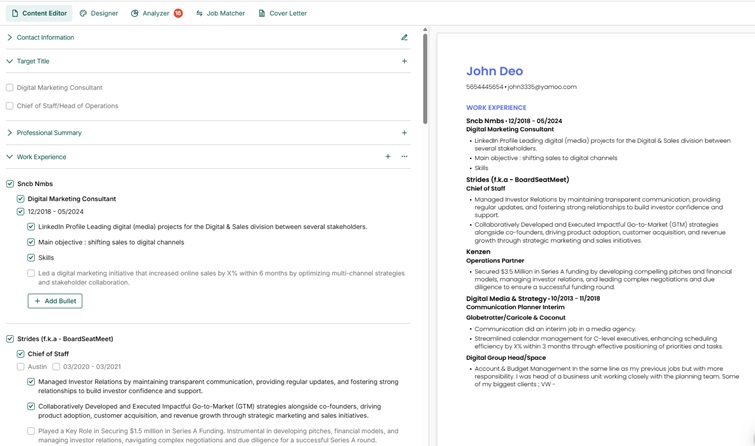
Teal Chrome Extension Alternative 2026: Tracker vs Optimizer
Teal's Chrome extension saves jobs to a kanban board but won't rewrite resumes. See the in-page optimization alternative...
Read More