With an existing resume, Resume Optimizer Pro is the best AI resume builder: it is the only one here that lets you tune each generated bullet, summary, and headline individually rather than accepting one fixed draft. Starting from nothing but a job title, Kickresume generates the fastest complete draft, and Rezi is the only vendor whose free tier states in writing what you get to keep. Robert Half's 2026 survey of more than 2,000 U.S. hiring managers, fielded in November 2025 by an independent research firm, found that 67% of HR leaders say reviewing AI-generated applications has slowed their hiring, and 20% report delays of more than two weeks. Generic AI output is now a measured liability rather than a shortcut. We tested eight builders on the same input, re-checked every price against the vendor's own pricing page on 13 October 2026, and labelled every figure we could not verify. This is the buy decision: which builder is worth paying for, and which free tier actually lets you download something usable.
Quick Picks: Best AI Resume Builder by Situation
Short on time? Here is who should use what.
Best Overall AI Resume Builder
Resume Optimizer Pro
Rewrites an existing resume against a specific posting, then lets you tune each generated bullet, summary, and headline for how concise, detailed, or focused it should be.
Best Verified Free Tier
Rezi
One resume and three PDF downloads, stated on Rezi's own pricing page. The only free tier here where the vendor publishes what you can walk away with.
Best for LinkedIn Import
Teal
One-click LinkedIn import, then a tailored version per posting. The free tier is widely reported as generous, but Teal's pricing page blocked our fetch, so treat the limits as reported.
Best for an Unusual Career Story
ChatGPT
No templates, no ATS check, manual formatting afterwards, but nothing reframes a non-linear career as flexibly. Budget 30 to 45 minutes end to end.
Why Generic AI Output Is Now a Liability
The case for AI resume builders used to be simple: recruiters are overloaded, so produce more applications faster. That argument has inverted. In the same Robert Half survey, 84% of respondents said their teams face heavier workloads and 65% of hiring managers said a surge in applications has made it harder to verify candidate skills. A vendor study from Resume.io, published in January 2025 and based on 3,000 hiring managers, reported that 49% of AI-generated resumes are dismissed automatically. Resume.io is a competitor here, so read that as a vendor's own research, though the direction matches Robert Half's independently fielded findings.
The automation now runs on both sides of the table. Greenhouse's 2026 Candidate AI Interview Report, based on 2,950 active job seekers, found 63% have been interviewed by an AI, up 13 percentage points in six months, and 38% have walked away from a process because it included one.
The consequence for tool selection: the winning feature in 2026 is not generation, it is control over what gets generated. A builder that emits one fixed block of text per bullet gives you nothing to steer with, and the result reads like every other resume the same model produced that day.
Where our approach differs: per-item tuning
Resume Optimizer Pro generates each bullet, summary, and headline as an individually tunable item. Push one bullet shorter, ask for more technical detail on another, or refocus a summary onto one part of the posting, without regenerating the document. Every other builder here ships one fixed output per section and leaves the editing to a plain text box. That is the direct answer to the Robert Half finding: the risk is not that a resume was drafted with AI, it is that it reads like an untouched default.
How We Tested
Every tool received the same input: a "Senior Marketing Manager" job title plus a short career summary, and, where the tool accepts one, the same target posting. We judged five things.
- Completeness of the first draft. A full resume, or fragments you still have to assemble?
- Keyword coverage against the posting. Not generic industry vocabulary, but the exact terms in the target job description.
- Parse safety. Single-column structure, standard headings, and no icons standing in for section headings.
- Editing required. How much rewriting stands between the draft and something submittable.
- What the free tier lets you leave with. Download format, watermarking, section caps, and AI limits, the axis most roundups skip.
Our pricing protocol, and why some cells say "reported"
On 13 October 2026 we tried to load every vendor's own pricing page again. Rezi, Kickresume, Novoresume, and Enhancv served theirs, so those figures are vendor-verified. Teal timed out repeatedly, Jobscan's pricing URL still redirects to an authenticated app route carrying no prices, Zety timed out repeatedly, and Canva's pricing page still returned HTTP 403. Novoresume's price moved since our last check: its monthly plan is up from $21.99 to $23.99.
Where a vendor page was unreachable we either name the third party we took the figure from and label it reported, or we leave the cell empty. Canva's pricing is absent for that reason, as is Enhancv's paid price, which renders on Enhancv's own page as a broken value in both currencies. We would rather publish a gap than a number we cannot stand behind.
What we bring that a general reviewer does not: we build resume optimization software that has to survive applicant tracking systems, so the parse-safety judgements here come from working on that problem rather than from reading vendor marketing. Our parser scores a resume across seven categories, including section structure, date formatting, and exact-match keyword coverage against a specific job description, and reports on a four-band scale: 0 to 49 fail, 50 to 69 weak, 70 to 84 okay, 85 to 100 strong. Band definitions are in our guide to what counts as a good ATS resume score.
What we deliberately do not publish: a head-to-head pass rate. An honest one would mean running every vendor's output through a controlled set of live applicant tracking systems, which is a different study. For the parse-side question, see our separate test of ten builders against Workday and Taleo in AI resume builder ATS test.
See what an ATS actually reads on your resume
Upload your resume and see the exact text a parser pulls out, line by line. We fix the formatting automatically.
AI Resume Builder Comparison Table
All eight tested tools side by side. Scroll right on mobile.
| Tool | Input required | Free tier | Starting price | Price source | Job-description matching |
|---|---|---|---|---|---|
| Resume Optimizer Pro | Resume plus job description | Free ATS check on a free account | $9.95/mo billed annually ($119.40/yr) | Our own published pricing | Yes |
| Kickresume | Job title only | Free plan exists, limits not published | $8/mo list price on the yearly plan | Vendor page, 13 Oct 2026 | No |
| Rezi | Job title plus brief details | 1 resume, 3 PDF downloads | $29/mo, or $149 lifetime | Vendor page, 13 Oct 2026 | Yes |
| Teal | LinkedIn profile or resume | Reported: unlimited resumes, 10 templates, limited AI credits | Reported $29/mo | Third-party (applyarc, jobsolv, pitchmeai); vendor page blocked | Yes |
| Wobo | Career details plus job title | Free builder tier | Not verified | Vendor marketing only | Yes, per Wobo |
| Novoresume | Section-by-section prompts | Basic: 1 version, 1 page maximum | 23.99 USD monthly | Vendor page, 13 Oct 2026 | No |
| ChatGPT | Custom prompt plus details | Yes | Free tier, paid Plus tier priced by OpenAI | Not fetched for this update | Only if you paste the posting |
| Enhancv | Resume or LinkedIn import | Free for 7 days, 12 section items maximum, Enhancv branding | Not verified | Vendor page loaded but rendered no usable price | Limited |
Prices checked 13 October 2026. We publish a column only when every cell can be filled from a checkable source, which is why there is no "company ownership" or "cancellation" column. Those are covered in What to Watch Out For, where each claim is attributed individually.
Best Free AI Resume Builder: What Each Free Tier Really Gives You
"Free" is the most abused word in this category. Almost every builder has a free plan; almost none lets you download a finished, unbranded resume on it. Four limits decide whether a free tier is usable, and vendors rarely publish all four in one place: download format, watermark or branding, a cap on sections or items, and the number of AI generations included.
| Vendor | What the free tier includes | Download allowed | Watermark or branding | AI limit | Verified or reported |
|---|---|---|---|---|---|
| Resume Optimizer Pro | ATS check against a job description on a free account | Optimized export is on paid plans | None | The free check is analysis, not AI rewriting | Our own product |
| Rezi | 1 resume, 1 AI interview, standard-format templates, limited Rezi Score, keyword targeting, and real-time content analysis | 3 PDF downloads | Not stated by the vendor | Limited, exact count not stated | Vendor-verified, 13 Oct 2026 |
| Kickresume | A free version exists. Students get free premium with ISIC, ITIC, or UNiDAYS proof | Not published | Not published | Not published | Vendor-verified that a free plan exists; no limits published |
| Novoresume | Basic: a single version, one page maximum, predefined layouts, no cover letter, 3 fonts, 30 colour themes | Not stated by the vendor | Not stated by the vendor | Not stated by the vendor | Vendor-verified, 13 Oct 2026 |
| Enhancv | All resume templates, basic sections, all design tools, valid for 7 days, maximum 12 section items | Not stated by the vendor | Enhancv branding | Not stated by the vendor | Vendor-verified, 13 Oct 2026 |
| Teal | Unlimited resumes and job tracking, Chrome extension, basic builder, 10 templates, Career Hub | Not stated in the sources | Not stated in the sources | Reported as 10 AI credits for bullet points, 2 for a professional summary, 2 for a cover letter | Reported by applyarc, jobsolv, and pitchmeai; vendor page returned 403 |
| Jobscan | 5 resume scans per month on a permanent free tier, no credit card | Not applicable, it scans rather than builds | Not applicable | 5 scans per month | Reported by onlineatschecker and pitchmeai; vendor page auth-gated |
| Zety | Build and edit free, then pay to download in a usable format | Reported as TXT only, which strips formatting | Not stated in the sources | Not stated in the sources | Reported by soundcv and pitchmeai; vendor page unreachable |
The verdict on free: to walk away today with a real PDF, Rezi's three free downloads are the only path here the vendor puts in writing. For ongoing use, Teal is better if the reported limits hold, since unlimited resumes and tracking cost nothing and only the AI credits are rationed.
The trap: a free plan that lets you build the whole resume then restricts the download to plain text. A TXT export drops every formatting decision you just made, so the resume has to be rebuilt elsewhere before it can be submitted. That pattern is reported on Zety's free plan.
1. Resume Optimizer Pro
Best for: Turning an existing resume into a job-specific version, then tuning the wording item by item
Price: $9.95/month on the annual plan ($119.40/year), $16.65/month quarterly, or $29.95/month. Free ATS check on a free account.
Website: resumeoptimizerpro.com
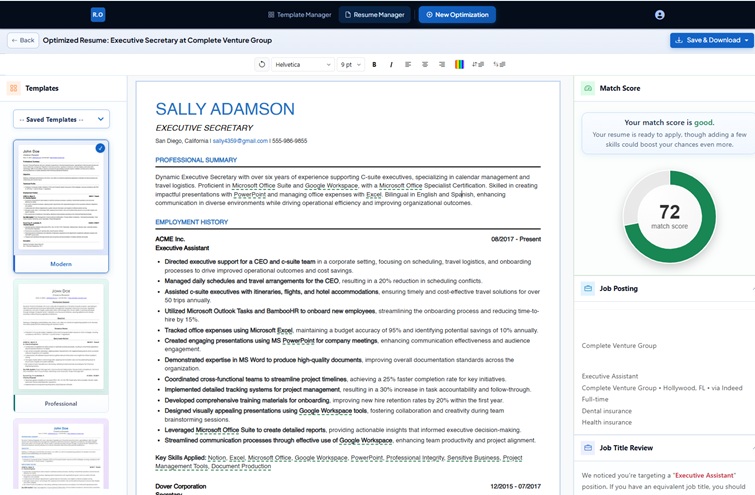
Upload an existing resume, paste the target posting, and the platform returns a rewritten version with the posting's language worked into the bullets, summary, and skills section. It rephrases your experience in the vocabulary of the target role rather than appending a keyword block, and it preserves the metrics already in your document. With no resume to start from, the AI Resume Builder generates one from a short question flow instead.
What separates it from everything else here is per-item tuning: each generated bullet, summary, or headline can be pushed shorter, longer, more technical, or refocused on a different part of the posting, individually, without regenerating the document. The AI Match Analysis then shows where your qualifications line up with the requirements and where the gaps are, which is what tells you whether to apply at all.
Pros
- Tailored rewrite from an existing resume in about 30 seconds
- Per-item tuning on every generated bullet, summary, and headline
- Match analysis shows gaps before you apply
- API for bulk generation, which no competitor here offers
Cons
- Best results need an existing resume; from-scratch generation is more limited
- Newer platform with fewer public reviews
- Smaller template library than Kickresume or Enhancv
Optimize My Resume →
2. Kickresume
Best for: Getting a complete draft from nothing but a job title
Price: List prices of $8/month yearly, $18/month quarterly, and $24/month monthly. A 20% promotion was still running on 13 October 2026, showing $6.40, $14.40, and $19.20 respectively. 14-day money-back guarantee. A free plan exists.
Website: kickresume.com
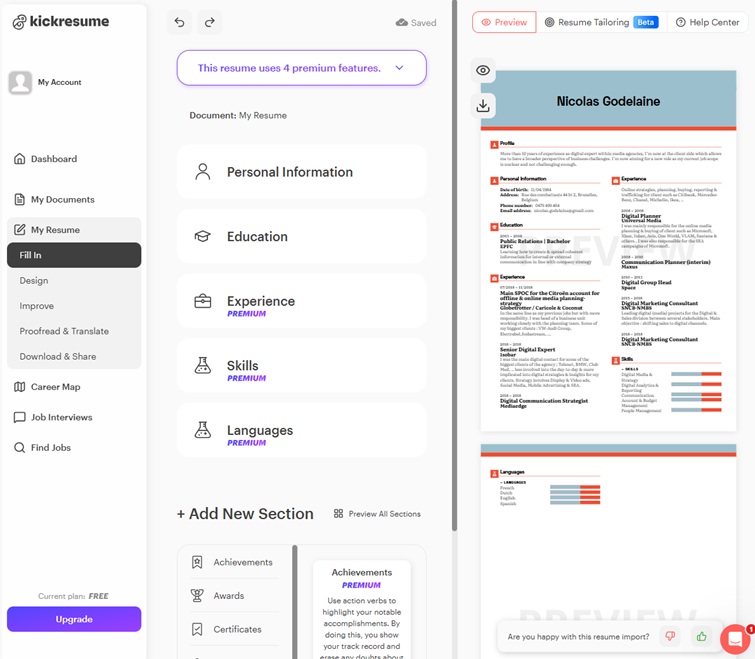
Kickresume is the fastest route from zero to a full draft. Enter a job title and its writing assistant returns a professional summary, experience bullets, and a skills section in about a minute. Premium unlocks the larger template library, a cover letter generator, and a built-in ATS checker. Students get premium free with ISIC, ITIC, or UNiDAYS proof, the best student offer in this comparison.
The limitation is specificity. Generating from a title rather than a posting means the output carries generic industry vocabulary instead of the exact terms in your target job description, so every application still needs tailoring. Kickresume's pricing page also confirms a free version exists without publishing its limits, so we cannot tell you what the free plan lets you download.
Pros
- Full resume from a job title alone
- Cheapest paid entry point, plus free premium for students
- Built-in ATS checker on paid plans
Cons
- Generates from a title, not a job description
- Free-tier limits are not published on the pricing page
- Advertised prices were promotional on the date we checked
3. Rezi
Best for: ATS-focused generation with live scoring, and the clearest free tier
Price: Pro $29/month, or $149 one-time lifetime. Enterprise $99/month per 200 users. 30-day money-back guarantee.
Website: rezi.ai
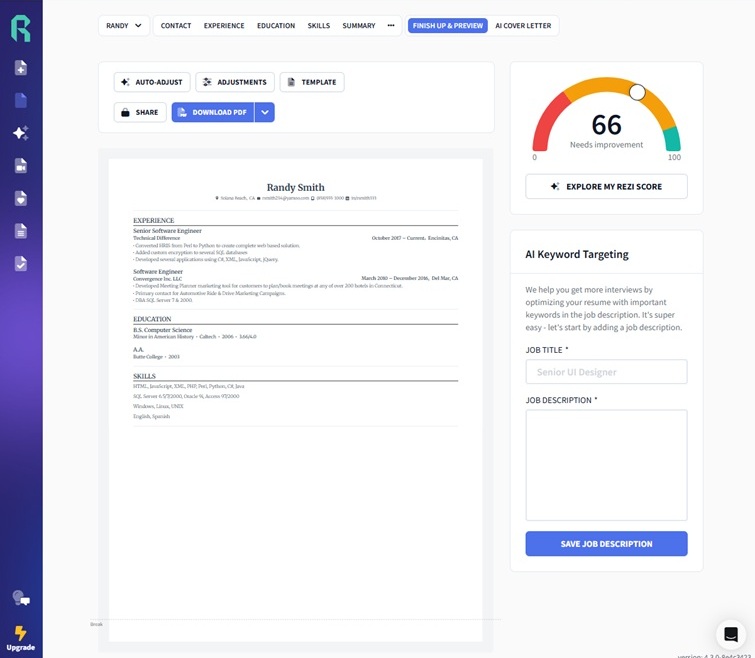
Rezi pairs generation with the most detailed live scoring in this set. Its bullet writer produces role-specific experience descriptions and its summary generator handles the opening block, while the resume is scanned against a fixed checklist in real time so the score moves as you edit. Paste a posting and Rezi proposes specific changes to lift the match, which makes it a genuine job-description tool rather than a title-driven one.
The trade-off is section-by-section generation rather than a finished document in one action, so it behaves more like a builder with strong AI than a one-click generator. Rezi is also the only vendor here that states its free tier precisely: one resume, one AI interview, three PDF downloads, with limited score, keyword targeting, and real-time analysis. That precision earns our best-free-tier pick even though the tier is small.
Pros
- Live ATS checklist scoring as you edit
- Keyword targeting from a pasted job description
- $149 lifetime plan, and free limits published exactly
Cons
- Section-by-section generation, not one click
- Free plan is capped at a single resume
- $29/month is the joint highest monthly price here
4. Teal
Best for: Generating from a LinkedIn profile and tracking a high-volume search
Price: Reported at $13/week, $29/month, or $79/quarter with no annual plan, by applyarc and jobsolv. Teal's own pricing page timed out again on 13 October 2026, so these are third-party figures.
Website: tealhq.com
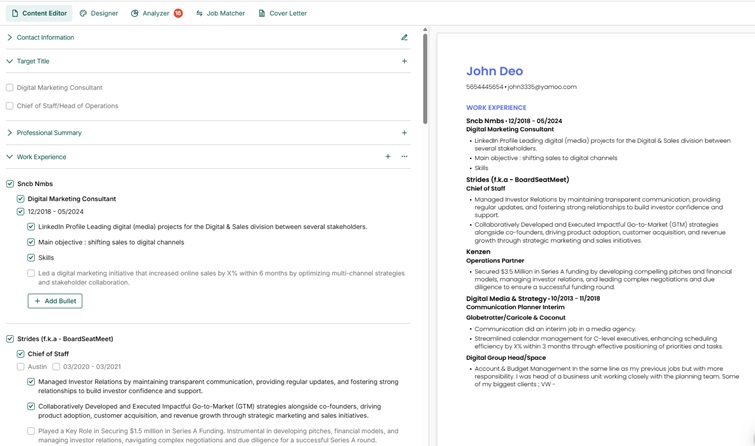
Teal is the strongest option for importing a LinkedIn profile once and then generating a tailored version per posting. Import pulls the full work history, the AI suite handles bullets, summaries, rewrites, and cover letters from that same profile data, and a match score shows how competitive each version is for a specific job.
What differentiates it is the surrounding platform rather than the generation. The job tracker saves postings, attaches the tailored resume to each, and manages the pipeline in one place, which pays off at volume. The reported free tier is the most generous here, with unlimited resumes and tracking and the AI rationed by credits: pitchmeai specifies 10 AI credits for bullet points, 2 for a summary, and 2 for a cover letter, none of which we could confirm against Teal.
Pros
- One-click LinkedIn import, then a version per posting
- Built-in job tracker and application pipeline
- Reported free tier covers unlimited resumes and tracking
Cons
- Pricing page blocks automated checks, so figures are third-party
- No annual plan reported; the weekly option is costly per month
- More of a job search platform than a pure builder
5. Wobo
Best for: Free generation bundled with application automation
Price: Not verified for this update. A free builder tier is available.
Website: wobo.ai
Wobo's angle is a persona layer: it learns your career story and writing style first, then generates content intended to sound like you rather than like a default model output. In testing the drafts came back less templated than title-driven generators, though at about two minutes it is the slowest tool here. Its structural claims, including a multi-point ATS analysis and job-board coverage for auto-apply, come from Wobo's own marketing and we could not verify them.
Auto-apply is the real decision point: submitting automatically removes the review step, so a misread posting becomes a submitted mistake rather than a caught one. Wobo is also newer, with a thin public track record, and we could not confirm its paid pricing from a source we trust.
Pros
- Persona layer produces less templated drafts
- Free builder tier
- Application automation built in
Cons
- Pricing not verifiable from a trustworthy source
- Auto-apply removes your review step
- Slowest generation in the comparison
- Newer platform, limited independent reviews
6. Novoresume
Best for: Guided, section-by-section generation with polished templates
Price: 23.99 USD monthly, 49.99 USD quarterly, or 199.99 USD annual. The pricing page states "Pay once. No recurring billing." Free Basic plan available.
Website: novoresume.com
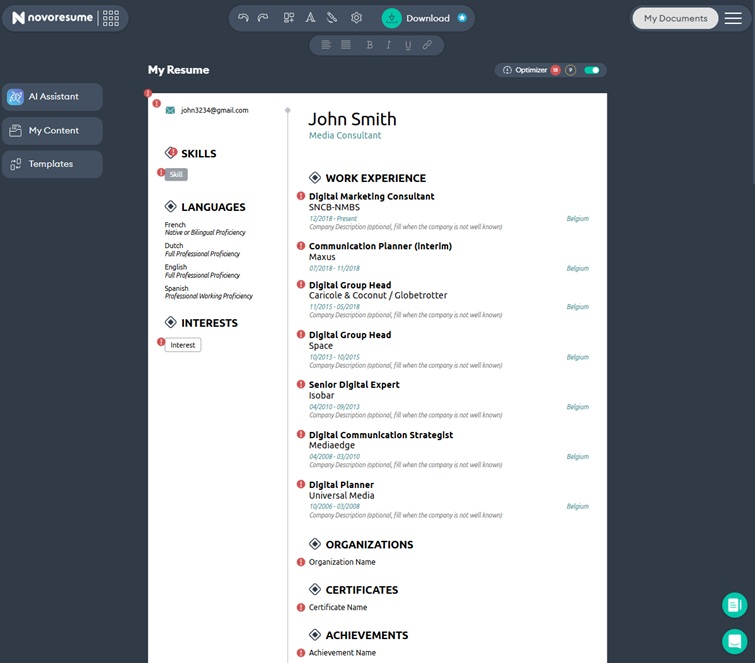
Novoresume works conversationally, prompting you section by section and generating text from your answers rather than producing a whole resume at once. The guided flow yields more accurate, personal content than one-click generation, at the cost of taking roughly three minutes end to end. The templates are the best-designed in this comparison and export cleanly to PDF and Word.
Output quality is uneven: some sections come back specific and usable, others fall back on stock phrasing. The free Basic plan is restrictive, limited to one version, one page, predefined layouts, three fonts, and no cover letter. A correction while we are here: our previous version of this page listed Novoresume at $17.99 monthly, which the vendor's own page no longer supports. The figure was 21.99 USD as of our August check and is 23.99 USD as of 13 October 2026, a real increase rather than a correction.
Pros
- Best-designed templates in this comparison
- Conversational flow produces personal content
- Pricing page states no recurring billing
Cons
- Inconsistent AI output quality
- No job-description keyword targeting
- Free plan caps you at one page and one version
7. ChatGPT
Best for: Maximum flexibility over generated content
Price: Free tier available; the paid Plus tier is priced by OpenAI. We did not re-check OpenAI's pricing page for this update.
Website: chat.openai.com
ChatGPT is the most flexible option and the most work. You supply the career history, the target role, and the formatting instructions, and you get text back to lay out somewhere else. The ceiling is high with a well-built prompt and the floor is low with a vague one. In our testing, generating section by section beat asking for a whole resume in one prompt, because each request stays narrow enough for the model to stay specific. For keyword targeting, paste the current resume and the posting together and ask for a rewrite aimed at that role.
The hard limitation is that ChatGPT produces plain text, not a document. Expect 15 to 30 minutes of formatting afterwards, with no templates and no parse checking. Given the Robert Half and Resume.io findings above, an unedited ChatGPT draft is the highest-risk submission here.
Pros
- Free tier is genuinely usable for drafting
- Handles any context or nuance you can describe
- Strongest for non-linear career histories
Cons
- No formatting, templates, or parse checking
- 15 to 30 minutes of manual formatting per resume
- Output quality tracks prompt quality
8. Enhancv
Best for: Design-forward output with content scoring
Price: Not verified. Enhancv's pricing page loaded again on 13 October 2026 but still rendered no usable price on either the euro or the dollar variant, so we are not publishing a figure. Free tier: valid for 7 days.
Website: enhancv.com
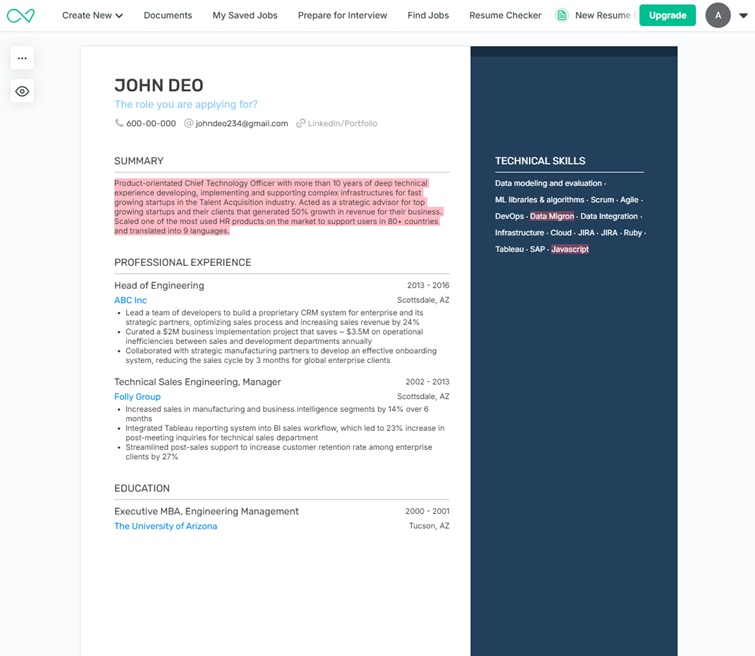
Enhancv sits between generator and builder, with strong AI writing tools inside the most visually polished interface here. Import a LinkedIn profile or upload a resume and it returns content suggestions, summary rewrites, and bullet improvements, with a content analyzer scoring the document and pointing at specific fixes. Its recommendations draw on Enhancv's own published resume trends research, a vendor study rather than independent work.
As a generator it is more guided than automatic: you still fill in sections while the AI suggests and rewrites. The free tier is the most restrictive here in a way that is easy to miss, because it expires after seven days, caps you at twelve section items, and carries Enhancv branding. Several design-led templates also add parse risk, so pick a single-column option if the resume is going through an applicant tracking system.
Pros
- Best visual design and template quality
- LinkedIn import plus a content analyzer with specific fixes
- Free tier gives full template access while it lasts
Cons
- Paid price could not be verified on the vendor's own page
- Free tier expires after 7 days, caps items at 12, carries branding
- Design-led templates can add parse risk
Also Worth Knowing: Jobscan, Zety, and Canva
These three come up constantly in best-AI-resume-builder searches without belonging in the tested set. Jobscan is a scanner rather than a builder, Zety's relevant story is its billing model, and Canva is a design tool pressed into resume duty.
Jobscan
Jobscan is the best-known name in resume-to-posting matching and the reference point other tools are measured against, but it is not a generator: you bring a finished resume and a posting, and it tells you what is missing rather than writing it. That makes it a complement to a builder, and the most useful tool here if you only need a diagnosis. Its pricing page redirects to an authenticated app route, so we have no vendor figures. Third-party sources onlineatschecker and pitchmeai report a permanent free tier of 5 scans per month with no credit card, $49.95 monthly, and $89.95 billed quarterly, roughly $29.98 per month. Those are reported figures, not vendor-quoted ones. Our comparison of the best ATS resume checkers covers the same job at other price points.
Zety
Zety builds a competent resume and has the templates to match. What to understand before starting is the exit path. Third-party sources soundcv and pitchmeai report that the free plan downloads in TXT only, stripping the formatting you just spent time on, and that paid access starts with a 14-day trial at $1.95 auto-renewing at $25.95 every four weeks, with an annual option reported at $5.95 per month billed $71.40 upfront. Zety's own page timed out repeatedly, so all of that is reported rather than vendor-verified. The four-week detail is covered in the next section, along with the ownership question, since Zety is one of the nine brands BOLD Limited names on its own about page. For the longer version, see our Zety alternatives comparison.
Canva
Canva is a design tool with resume templates, not a builder with AI generation, and the distinction matters more than its popularity suggests. Its strongest templates are visually excellent and structurally risky for automated screening: multi-column layouts, icons standing in for section labels, and graphical skill bars are all things parsers handle badly or drop. A resume that wins a portfolio review can reach a recruiter as a jumble of fragments. We publish no Canva pricing: its pricing page returned HTTP 403 again on 13 October 2026 and no substitute met our bar. If a human is the first reader, Canva is fine. If the file goes into an application portal, rebuild it single-column with standard headings, or at minimum parse-check the exported PDF.
What to Watch Out For: Billing and Ownership
The part that generates the most complaints about these tools is not output quality. It is what happens after you enter a card.
The four-week billing cycle
Several resume products bill every four weeks rather than monthly. A four-week cycle produces 13 charges a year, not 12, so the annualised cost runs roughly 8% above the same headline number billed monthly. On the reported Zety renewal price of $25.95 every four weeks, that is about $337 a year rather than the roughly $311 a monthly reading suggests. Check the exact billing words at checkout: "every 4 weeks" and "per month" are not the same product.
The ownership question sits behind it. Several of the biggest resume brands share a parent company, which is not obvious from any of their individual sites. BOLD Limited, headquartered at City View Plaza II, 48 Road 165, Suite 6000, Guaynabo, Puerto Rico, names nine brands on its own about page, checked 13 October 2026: My Perfect Resume, Monster, FlexJobs, Bold.pro, CareerBuilder, Sonara, Zety, LiveCareer, and My Perfect Cover Letter.
That is corporate structure, not a criticism of any of them, and it is published by the company itself rather than inferred. The practical consequence is narrow and still worth knowing: several products presenting themselves as independent alternatives to one another sit under one roof, so a shortlist drawn from them is less diversified than it looks, and a billing arrangement you dislike at one is more likely to repeat at another. For the practical detail on cancelling in this category, see our guides on whether Resume-Now is legitimate and Resume-Now alternatives.
Three checks before you pay for any resume tool
- Find the cancellation path first, in the product rather than the marketing site. If it needs an email or a form instead of a button, plan for days.
- Read the renewal price, not the trial price. The trial figure is the ad; the renewal figure is what you pay, and the gap is frequently more than tenfold.
- Check the billing wording. "Every 4 weeks" is 13 payments a year. Screenshot the checkout page, which is the evidence that counts in a dispute.
AI Resume Generator vs AI Resume Builder: What Is the Difference?
Marketing uses these terms interchangeably, but they describe two different products, and picking the wrong one wastes the most time.
| Feature | AI resume generator | AI resume builder |
|---|---|---|
| Primary action | Creates a complete resume from minimal input | Guides you through building a resume step by step |
| Input required | Job title, LinkedIn profile, or a brief career summary | You fill in each section yourself |
| Time to first draft | 30 seconds to 3 minutes | 15 to 45 minutes |
| Control over content | Lower, unless the tool exposes per-item tuning | Higher, since you approve each section |
| Best for | Speed, first drafts, career changers who need fresh content | Precision, experienced professionals who want control |
| Editing needed after | Moderate to significant: verify facts, add specifics | Minimal, because you wrote it |
Most job seekers should generate the first draft, then tailor it per application with an AI resume rewriter. For the hands-on route, see our walkthrough of ChatGPT as a resume builder.
Best AI Resume Builder for Your Situation
The right builder changes with what you are solving for. Four situations come up often enough to call out on their own.
| Situation | Pick | Why |
|---|---|---|
| Career change | ChatGPT, then Resume Optimizer Pro to tailor | A model you can argue with reframes transferable experience better than a template-driven generator. Draft the story in ChatGPT, then run it against the actual posting for keyword coverage and ATS-safe formatting. |
| No work experience | Kickresume | Generating from a job title alone matters most when there is little career history to feed a tool. Expect to add specifics the draft cannot know, like coursework, projects, or volunteer roles. |
| ATS-heavy employers (large enterprise) | Rezi or Resume Optimizer Pro | Both prioritize single-column, standard-heading output and score keyword coverage against the posting rather than just writing prose. |
| U.S. federal applications | None of the eight, with a caveat | Federal resumes (USAJobs) need a different structure, including hours worked per week and detailed duty descriptions, that none of these builders are purpose-built for. Use a general builder for the draft, then rebuild it by hand using our federal resume template. |
Quick decision tree: have a resume already? Start with Resume Optimizer Pro. Starting from nothing and need speed over precision? Kickresume. Need the clearest free download? Rezi. Managing a high volume of applications? Teal. Everything else is a variation on those four.
What to Check After Generating Your Resume with AI
No builder here produces a submittable resume on the first pass, and the Robert Half findings above are why this review step now carries real weight.
Post-generation checklist
- Fact-check every claim. Generators occasionally invent achievements, certifications, or metrics. Verify every number, title, and company name.
- Remove generic filler. Replace "results-oriented professional" and "proven track record" with specific accomplishments and data.
- Verify parsing. Run the generated PDF through a checker. Watch for non-standard fonts and multi-column layouts.
- Match keywords to the posting. Generated output carries industry vocabulary while missing the exact terms in your target job description.
- Add your real numbers. No AI knows your metrics. Replace placeholders with actual revenue, team sizes, and percentage improvements.
- Read it aloud. Generated text is stilted in ways silent scanning misses. This is the cheapest defence against the pattern behind the Resume.io study's 49%.
Our Verdict by Use Case
No single tool wins this category outright. The right answer depends on what you are starting with.
You already have a resume
Resume Optimizer Pro. Upload it with the posting, get a tailored version in about 30 seconds, then tune individual bullets rather than accepting the default output.
Starting from scratch with no budget
Kickresume for the draft, Rezi to download. Kickresume generates from a job title alone but publishes no free limits. Rezi states in writing that its free tier includes three PDF downloads.
Applying to many jobs at once
Teal. Import LinkedIn once, then generate a version per posting with the tracker keeping the pipeline straight. The reported free tier covers unlimited resumes, so volume costs nothing until the AI credits run out.
You want the score, not the writing
Rezi or Jobscan. Rezi scores live as you edit, which suits people who want to iterate. Jobscan diagnoses a finished resume against a posting, at a reported free allowance of 5 scans per month.
Design matters more than parsing
Enhancv or Novoresume. Both produce the best-looking documents here. Pick single-column templates for an application portal, and note Enhancv's free tier expires after 7 days.
An unusual or non-linear career
ChatGPT. Career changers, military-to-civilian transitions, and long gaps get the most from a model you can argue with. Budget 30 to 45 minutes including formatting.
Approach with caution
Any tool billing every four weeks, and any auto-apply feature. The first costs 13 payments a year instead of 12. The second submits applications without your review, which turns a misread posting into a submitted mistake.
Optimize My Resume →
Frequently Asked Questions About AI Resume Builders
Related Articles

AI Resume Builder ATS Test: 10 Tools on Workday and Taleo
We ran the same resume through 10 AI resume builders on Workday, Greenhouse, Lever, iCIMS, and Taleo. See which parsed c...
Read More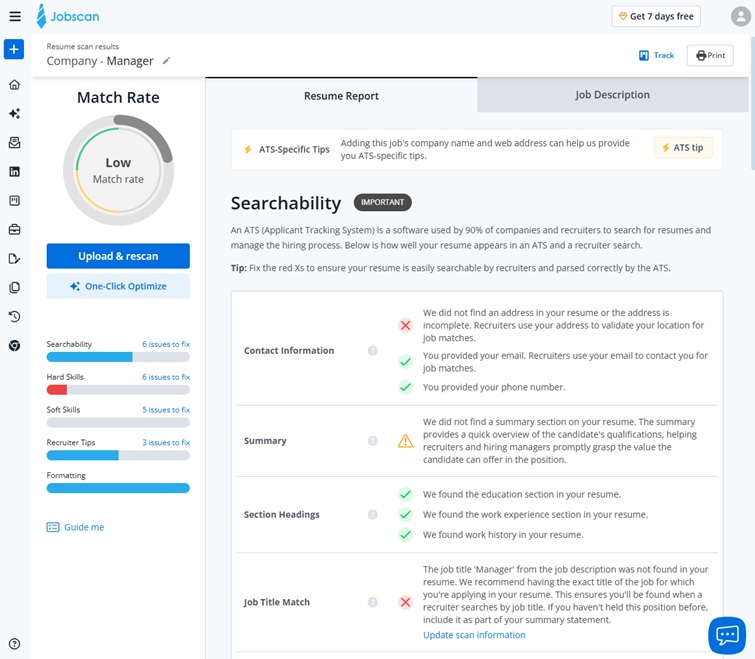
Best AI for Resume Writing in 2026: Which Tools Actually Pass ATS
Best AI for resume writing in 2026: ChatGPT, Claude, Gemini and purpose-built tools compared on ATS-awareness and job-de...
Read More
Best Free ATS Resume Checker 2026: 9 Tools Tested & Compared
We ran 9 ATS resume checkers on the same resume: only 6 have a genuinely free tier. Compare Jobscan, Resume Worded, Skil...
Read More