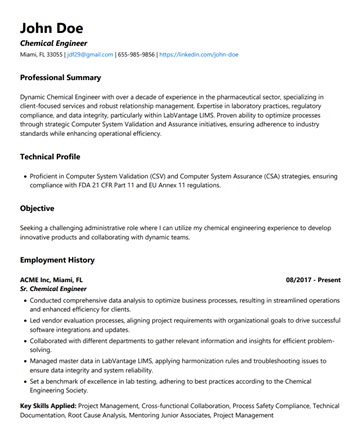
Classic
The safest option on this page. Plain section headings, no styling a parser has to guess at. Use it when the job posting matters more than the design.
Eight Word templates, single column, no text boxes, no headers that vanish on extraction. Download any of them free, no account needed.
Grouped by career situation, because the right template is mostly a question of what your history looks like, not what you find prettiest.
Best for a steady career path with no major gaps. Reverse-chronological, the layout every ATS was built to read first.
The safest option on this page. Plain section headings, no styling a parser has to guess at. Use it when the job posting matters more than the design.
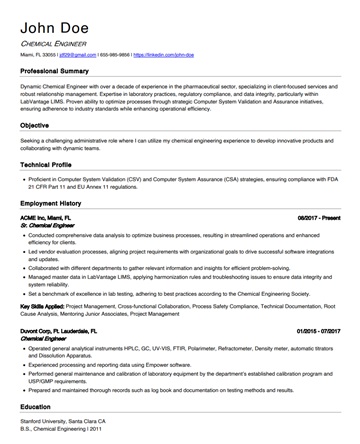
Classic structure with a left-weighted heading treatment and more breathing room. Reads the same to a parser, looks less dated to a human.
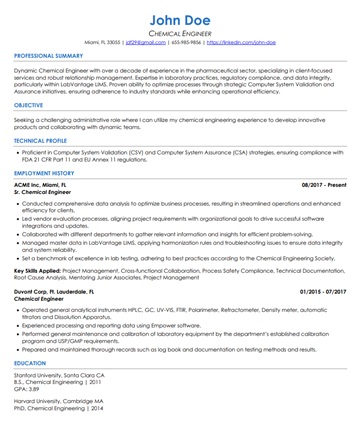
Tightened margins and line spacing to hold a full history on one page. Use it when you have more to say than a page normally allows and cutting content is worse.
For leadership, consulting, and senior individual contributors. Two-page friendly, because at this level a forced one-pager costs you the evidence.
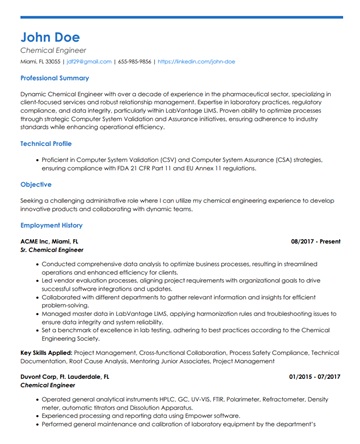
Leads with a summary band above the experience, which is where an executive search reader looks first. Holds up across two pages without the second page reading as an afterthought.
Restrained colour and rule work for tech, design, marketing, and startup roles. Visual enough to sit in a portfolio, still single column underneath.
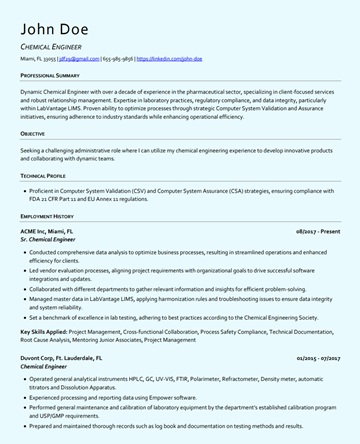
A single solid colour block behind the name, everything else plain. The cheapest way to look designed without giving a parser anything to trip on.
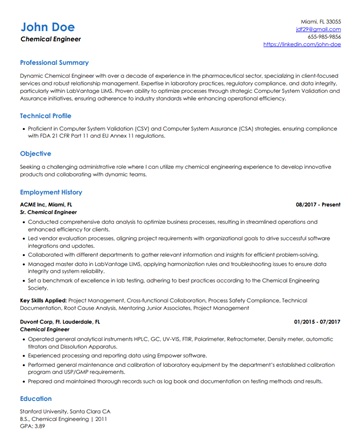
Right-aligned contact details and a lighter type scale. Note this is the one layout here that reads as two columns to the eye and still extracts in a single flow.
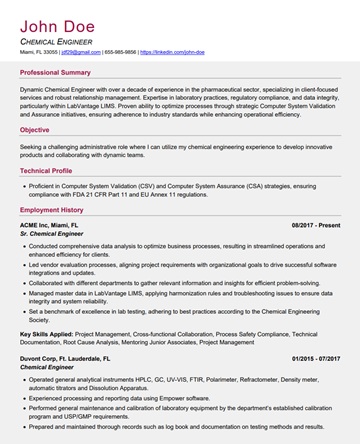
The most styled option we will ship. Two-tone headings and rules, still no text boxes or graphics. If a template is more visual than this one, it is costing you extractions.
Puts capability above chronology so a reader meets your skills before they meet the gap or the pivot.
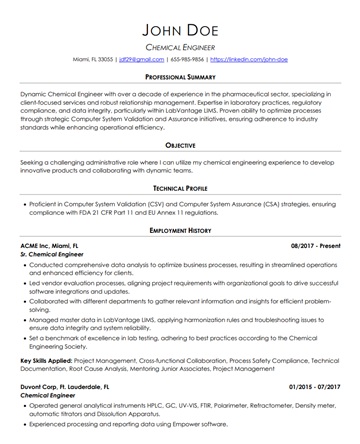
A skills block ahead of the work history, then a normal reverse-chronological run. The hybrid shape that still parses, unlike a true functional resume.
The layout is the part you can fix by downloading a file. The keywords, the section names, and the text an ATS actually extracts from what you type into it are not. Upload the finished resume and see the parsed output before you send it anywhere.
Show Me What an ATS Reads →Both handle these files. If you import into Google Docs, re-download as .docx rather than submitting the Google link, because the export is what an employer's system receives.
Replace text in place. Do not paste styled text from another document, which is the single most common way a working template stops parsing.
Experience, Education, Skills. Renaming these to something more distinctive is the change people most often make and most often regret, because parsers match on the standard words.
Run the finished file through the checker. It shows the extracted text line by line, so you can confirm nothing you added went missing.
Template galleries optimise for what looks good in a thumbnail. Those are frequently the same choices that lose text on extraction.
A parser reading left to right across the full page width interleaves your skills sidebar into your job history. The result is grammatical nonsense that still gets scored.
Word headers and footers sit outside the document body. Some parsers never open them, so the resume arrives with no phone number and no email.
Visually identical to normal text, structurally invisible to a lot of extractors. Anything in a box is a coin flip on whether it survives.
An envelope glyph instead of the word Email reads as nothing at all. The same goes for skill rating dots, which carry no extractable value.
"Where I have been" instead of "Experience" costs you the section match. The parser is looking for a known vocabulary, not for personality.
Canva and Figma exports frequently carry text as vector outlines or in unpredictable reading order. Send .docx unless the posting demands otherwise.
Yes. Every template on this page downloads as a Word file with no account, no email, and no trial. The paid product is the optimizer that rewrites and scores a resume against a specific job, which is a different thing from the blank layout.
They are built to the constraints parsers impose: single column, no text boxes, no header or footer content, standard section headings, and live text rather than images. That removes the structural failures. It does not guarantee a score, because the content you write into the template is what gets matched against the job.
Send .docx unless the posting explicitly asks for PDF. A well-made PDF parses fine, but a PDF exported from a design tool often does not, and you cannot tell the difference by looking at it. Word removes that uncertainty.
Match it to your history rather than your taste. Steady progression takes Classic or Modern. A pivot or a gap takes Professional, which leads with skills. Leadership takes Signature. If you are undecided, Classic is the lowest-risk choice in every industry.
Fonts and colours are safe to change, within reason. Keep to a common font that ships with Word so the file renders the same on the reader's machine. What you should not change is the structure: do not add columns, move contact details into the header, or place text inside a shape.
No. Pick one layout and keep it. What should change per application is the content, specifically the keywords and the emphasis, which is what the checker and optimizer handle.
Upload the resume you built from one of these templates and see the exact text a parser pulls out of it, line by line.
The matching set. Copy-paste cover letter layouts built to the same parsing rules as the resumes above.
No resume to start from? Answer a few questions and get a first draft in one of these layouts instead of staring at an empty template.
The long read: how these layouts were tested, what the common failure modes look like in practice, and how the alternatives compare.
Upload the finished resume and see what an ATS reads, then let us align it to the posting you are actually applying for.
Check My Resume Free →