Before an applicant tracking system can search, score, or display a resume, something has to pull the words out of the PDF or Word file and turn them into plain text. That one step, text extraction, is the part of the pipeline this study measures. We built 74 resume files across 20 layout archetypes, ran them through five generic open-source text extractors plus our own engine, and recorded exactly what came out.
This is original research using entirely synthetic, fictional resume data. No real resume, uploaded file, or user data was read or analyzed at any point.
The Direct Answer
- Section headings rendered as images are invisible to every extractor tested: 0 of 14 applicable candidate-by-extractor rows recovered any of the 5 headings on the image-headings layout, with no exceptions.
- A scanned, image-only PDF with no text layer loses essentially everything: token loss share of 1.000 for both candidates across all 4 applicable extractors, and 0 percent recovery on name, email, and phone.
- Two-column and shaded-sidebar table layouts keep their content but change its order, and the Word and PDF versions fail differently. In the Word files, every extractor read the entire sidebar (Skills, Education, Certifications) as one intact block before the Summary and Experience, so heading order scored 0 percent even though each section stayed whole. In the PDF exports, the sequence itself broke down: the shaded sidebar PDF kept headings in order in only 37.5 percent of rows, recovered all 5 headings in 37.5 percent, and had a median reading-order similarity of 0.12. Across both formats, the median share of jobs with title, company, and date still adjacent stayed at 1.00.
- Floating text boxes are a tool-dependent blind spot: on the sidebar-text-box Word file, python-docx dropped phone and email entirely for both candidates, while docx2python and our own engine recovered the text box in full. The PDF export of the same layout was worse for everyone, with pdftotext losing 12.0 to 14.3 percent of tokens on either candidate.
- Whether a narrow sidebar's email address survives extraction can depend on the email's own length: in the narrow two-column table layout, candidate 1's longer address wrapped mid-string across all 4 applicable extractors, while candidate 2's shorter address at the same layout did not wrap and was recovered by all 4.
Method, in Brief
We built two fictional candidates: a mid-career operations manager with three jobs, and a recent graduate with two shorter jobs, so layout risk could be checked against two different content shapes rather than one. Each candidate's content was rendered into 20 layout archetypes, 37 files per candidate, 74 files total, covering choices like single-column paragraphs, tab-stop-aligned dates, two-column tables, floating text boxes, header or footer contact blocks, icon glyphs in place of labels, image-based skill bars, image-based section headings, native Word heading styles, a compact dense layout, a scanned image-only page, a design-tool-style two-column PDF built from HTML and CSS, our own app's default template, a Google Docs style export, a skills-only table grid, a forced two-page resume, OOXML hyperlinks on contact details, and a header-only PDF built directly without a word processor.
Each applicable file was run through our own extraction engine (the same one behind the free /ats-resume-checker tool) and five generic open-source libraries: poppler's pdftotext (default and layout modes), pdfminer.six, python-docx, and docx2python. That produced 262 (candidate, file, extractor) rows in total.
For each row we measured: whether name, email, and phone were recovered at all and within the first 6 lines; how many of 5 canonical section headings were found (matched against a documented synonym list, so "Professional Summary" counts for "Summary" and "Employment History" counts for "Experience"); whether those headings came out in the reference order; what share of each candidate's jobs kept title, company, and date adjacent to each other; how closely the extracted line order matched the canonical reading order (difflib sequence similarity); and what share of ground-truth content words were missing entirely from the extracted text.
The full method, every metric's exact definition, the synonym list, and the rerun steps are in the README of the downloadable study package (see "Reproduce this study" below). Every number in this article is read directly from results.csv in that package. Nothing here is estimated or rounded up.
Findings by Layout
The table below is the median across extractors and both candidates for each file. "head5" is the share of (candidate, extractor) rows that recovered all 5 section headings; "ordOK" is the share with headings in the reference order; "jobs adj." is the median share of jobs with title, company, and date all adjacent; "med. RO" is median reading-order similarity (0 to 1); "med. loss" is median token loss share (0 to 1). Where two numbers are shown, the first is the Word (.docx) file and the second its exported PDF.
| Layout | head5 % | ordOK % | jobs adj. | med. RO | med. loss |
|---|---|---|---|---|---|
| Single column, plain | 100 | 100 | 1.00 | 0.78 / 0.58 | 0.000 |
| Tab-stop right-aligned dates | 100 / 75 | 100 | 1.00 | 0.68 / 0.54 | 0.000 |
| Two-column borderless table | 100 / 25 | 0 / 50 | 1.00 | 0.49 / 0.21 | 0.000 |
| Two-column Word section | 100 / 75 | 100 / 87.5 | 1.00 | 0.78 / 0.30 | 0.000 |
| Sidebar in floating text box | 66.7 / 37.5 | 33.3 / 62.5 | 1.00 / 0.17 | 0.57 / 0.37 | 0.000 / 0.078 |
| Header/footer contact block | 100 | 100 | 1.00 | 0.71 / 0.48 | 0.000 |
| Icon glyphs for contact labels | 100 | 100 | 1.00 | 0.78 / 0.58 | 0.000 |
| Skill bars as an image | 100 | 100 | 1.00 | 0.79 / 0.55 | 0.054 |
| Section headings as images | 0 | 100 | 1.00 | 0.60 / 0.35 | 0.000 |
| Two-column shaded sidebar | 100 / 37.5 | 0 / 37.5 | 1.00 | 0.51 / 0.12 | 0.000 |
| Native Word heading styles | 100 | 100 | 1.00 | 0.69 / 0.51 | 0.000 |
| Compact single column (9.5pt) | 100 / 75 | 100 | 1.00 | 0.78 / 0.53 | 0.000 |
| Scanned image only | 0 | 100 | 0.00 | 0.00 | 1.000 |
| Design-tool-style two-column PDF | 25 | 50 | 1.00 | 0.24 | 0.000 |
| Our app's default template | 100 | 0 | 1.00 | 0.49 / 0.34 | 0.000 |
| Google Docs style export | 100 | 100 | 1.00 | 0.71 / 0.35 | 0.000 |
| Skills section as a table grid | 100 / 75 | 100 | 1.00 | 0.69 / 0.52 | 0.000 |
| Forced two-page resume | 100 | 100 | 1.00 | 0.78 / 0.53 | 0.000 |
| OOXML hyperlinks on contact info | 100 | 100 | 1.00 | 0.78 / 0.58 | 0.000 |
| Header-only PDF, non-Word-built | 75 | 100 | 1.00 | 0.53 | 0.000 |
Source: per-layout medians computed from results.csv in the downloadable study package.
What Held Up
Twelve of the 20 layouts recovered all 5 headings, kept them in order, and lost zero content tokens on at least the .docx version: plain single-column paragraphs, tab-stop-aligned dates, a real Word two-column section, a header or footer contact block, Unicode icon glyphs for contact labels, native Word heading styles, a compact dense layout, a Google Docs style export, a skills-only table grid, a forced two-page resume, and OOXML hyperlinks on the email and LinkedIn line. None of the five archetypes added for this round of testing (the Google Docs export, the skills table, the two-page layout, the hyperlinked contact line, and the directly-built PDF) showed a layout-specific extraction failure: a real OOXML hyperlink's visible text extracted exactly like plain text in every tool, a forced page break did not lose or duplicate content, and the PDF built without any word processor in the pipeline parsed as cleanly as a Word-exported one.
What Did Not
Images in place of text are invisible
The layout with section headings baked into images scored 0 percent heading recovery on both the Word and PDF versions, across all 14 applicable candidate-by-extractor rows. None of these tools perform OCR, so an image is simply blank space to them. A skill-bars-as-image layout kept its headings (they were still real text) but lost 5.4 percent of content tokens, the skill levels themselves, on every extractor.
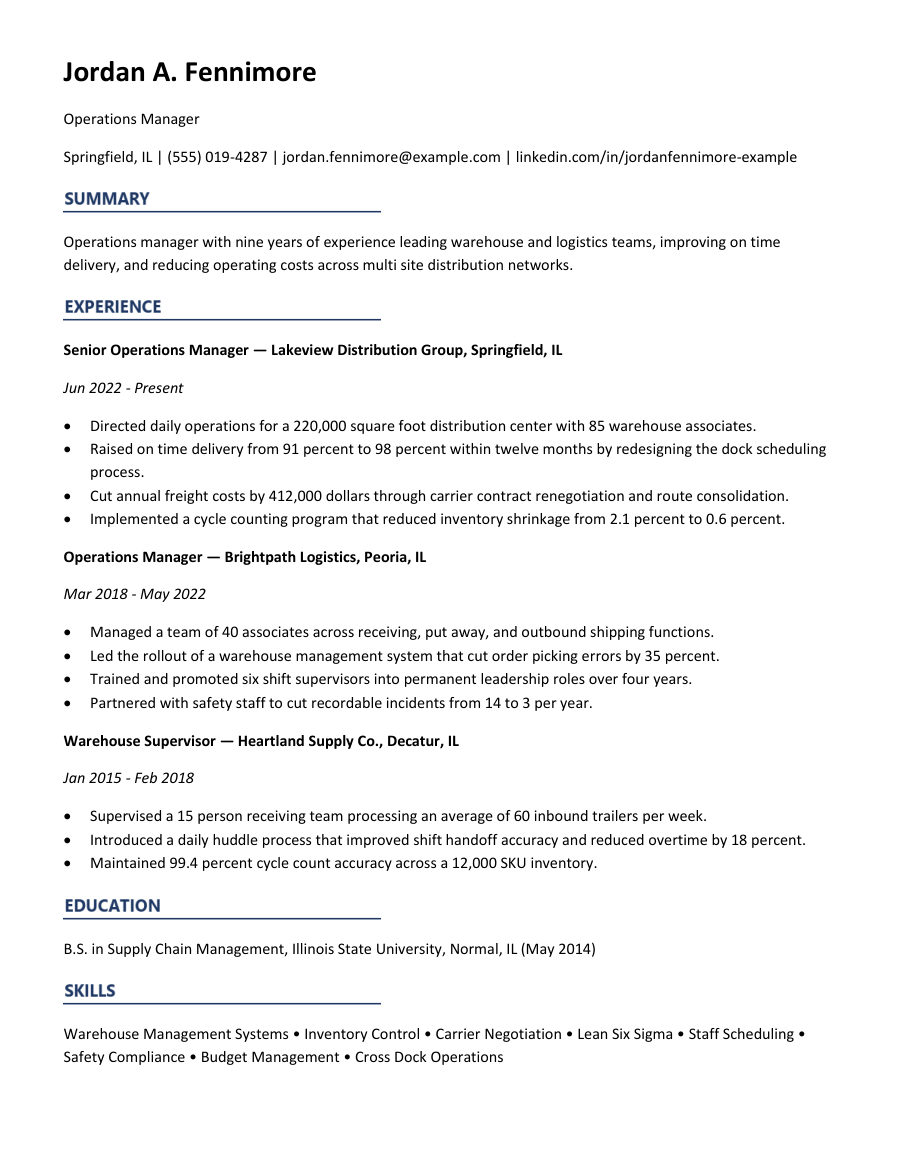
The section headings on this page look like styled text but are images. No extractor in this study performs OCR, so every one of them comes out blank.
What pdftotext actually extracted
Jordan A. Fennimore
Operations Manager Springfield, IL | (555) 019-4287 | jordan.fennimore@example.com | linkedin.com/in/jordanfennimore-example
Operations manager with nine years of experience leading warehouse and logistics teams...
Senior Operations Manager, Lakeview Distribution Group, Springfield, IL, Jun 2022 through Present ...
B.S. in Supply Chain Management, Illinois State University, Normal, IL (May 2014)
Warehouse Management Systems • Inventory Control • Carrier Negotiation • Lean Six Sigma ...
Not one of "Summary," "Experience," "Education," "Skills," or "Certifications" appears anywhere in the output. All of the body content came through; every heading did not.
A sidebar built as a floating text box is a coin flip
On the Word version, python-docx missed the phone and email for both candidates entirely, while docx2python and our own engine recovered the text box in full. The PDF export was worse across every extractor: pdftotext in both modes lost 12.0 to 14.3 percent of content tokens for either candidate, and the median share of jobs with title, company, and date still adjacent across this file's rows was 0.17, the lowest of any PDF layout except the fully scanned one.
Two-column and shaded-sidebar layouts change order, not content, and the format decides how
In the Word files of both the shaded two-column table and the narrow borderless two-column table, every extractor (python-docx, docx2python, and our own engine) read the left sidebar cell first, so Skills, Education, and Certifications came out as one intact block ahead of the Summary and Experience. That scored 0 percent heading order, but each section stayed whole and in its own internal order: a block move, not a scramble. The PDF exports are where the sequence broke down. Headings were dropped or out of place in most rows (the shaded sidebar PDF kept all 5 headings in only 37.5 percent of rows and kept them in order in 37.5 percent), and median reading-order similarity fell to 0.12 for the shaded sidebar and 0.21 for the borderless table, against 0.51 and 0.49 for their Word files. The design-tool-style two-column PDF scored 50 percent order with a median reading-order similarity of 0.239. In all of these, the median share of jobs with title, company, and date still adjacent stayed at 1.00: individual jobs held together even where the page as a whole did not.
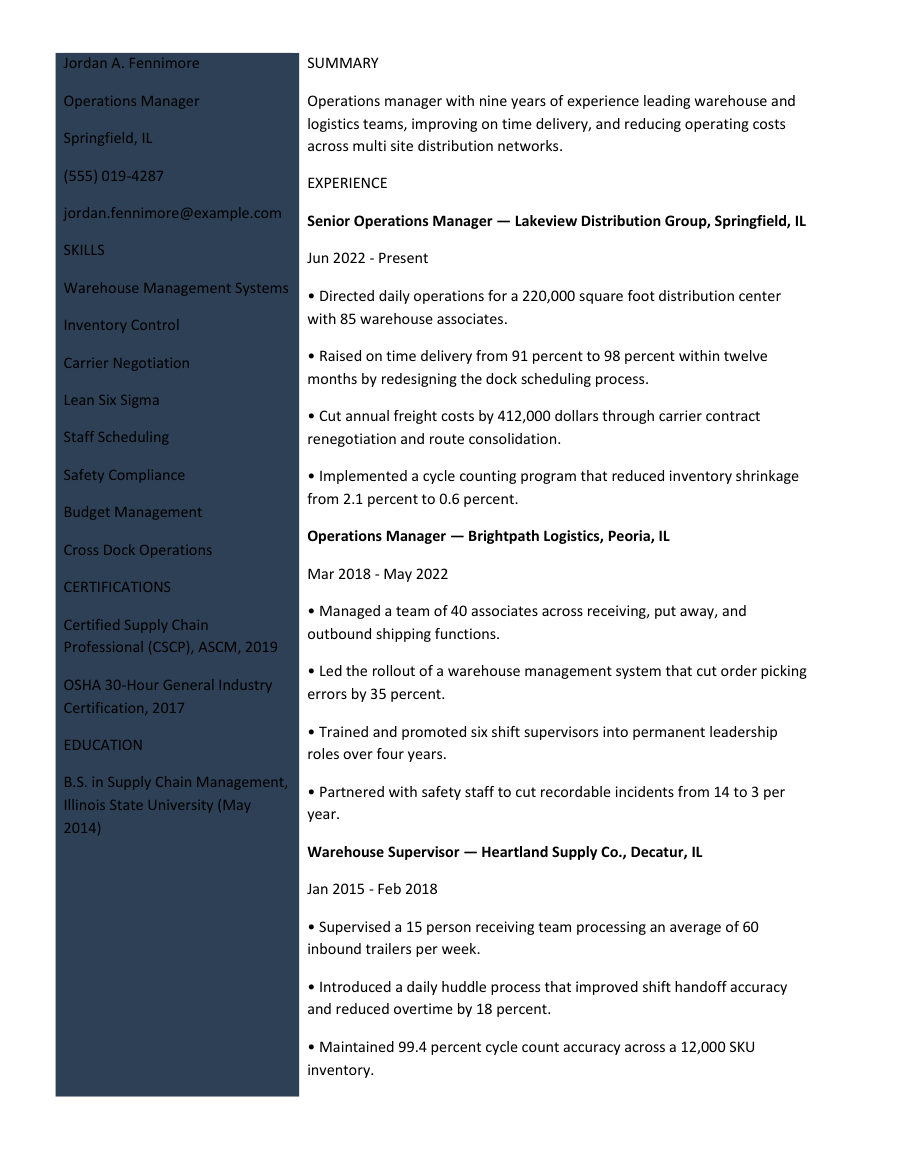
The shaded sidebar PDF: content and a visual order that looks clean on the page.
pdftotext_default output, in extraction order
1 Jordan A. Fennimore
2 SUMMARY
3 Operations Manager Springfield, IL
4 Operations manager with nine years of experience...
5 (555) 019-4287
6 EXPERIENCE
7 jordan.fennimore@example.com Senior Operations Manager...
8 SKILLS
9 Jun 2022 through Present
10 Warehouse Management Systems • Directed daily operations...
11 Inventory Control
12 with 85 warehouse associates.
SKILLS surfaces between a date line and a job bullet, and the phone number lands two lines before EXPERIENCE. The PDF export reads across the page's visual rows rather than down the sidebar, so the two columns interleave line by line. Median reading-order similarity for this file: 0.12.
A long email in a narrow column can wrap mid-string
In the narrow two-column table layout, candidate 1's email address (longer) wrapped across a line break inside the narrow sidebar column and failed to extract cleanly across all 4 applicable extractors. The same layout rendered for candidate 2, whose email is shorter, did not wrap, and all 4 extractors recovered it. The layout is a genuine risk factor; whether it actually breaks the email on a given resume depends on how long that person's own email happens to be relative to the column's fixed width.
A resume with zero text layer loses everything
The scanned-image-only PDF, built by rendering text onto a page image with no embedded text layer, produced a token loss share of 1.000 and 0 percent recovery on name, email, and phone, consistent across both candidates and all 4 applicable extractors. This stands in for a phone photo or flatbed scan of a printed resume, not a PDF exported from a word processor.
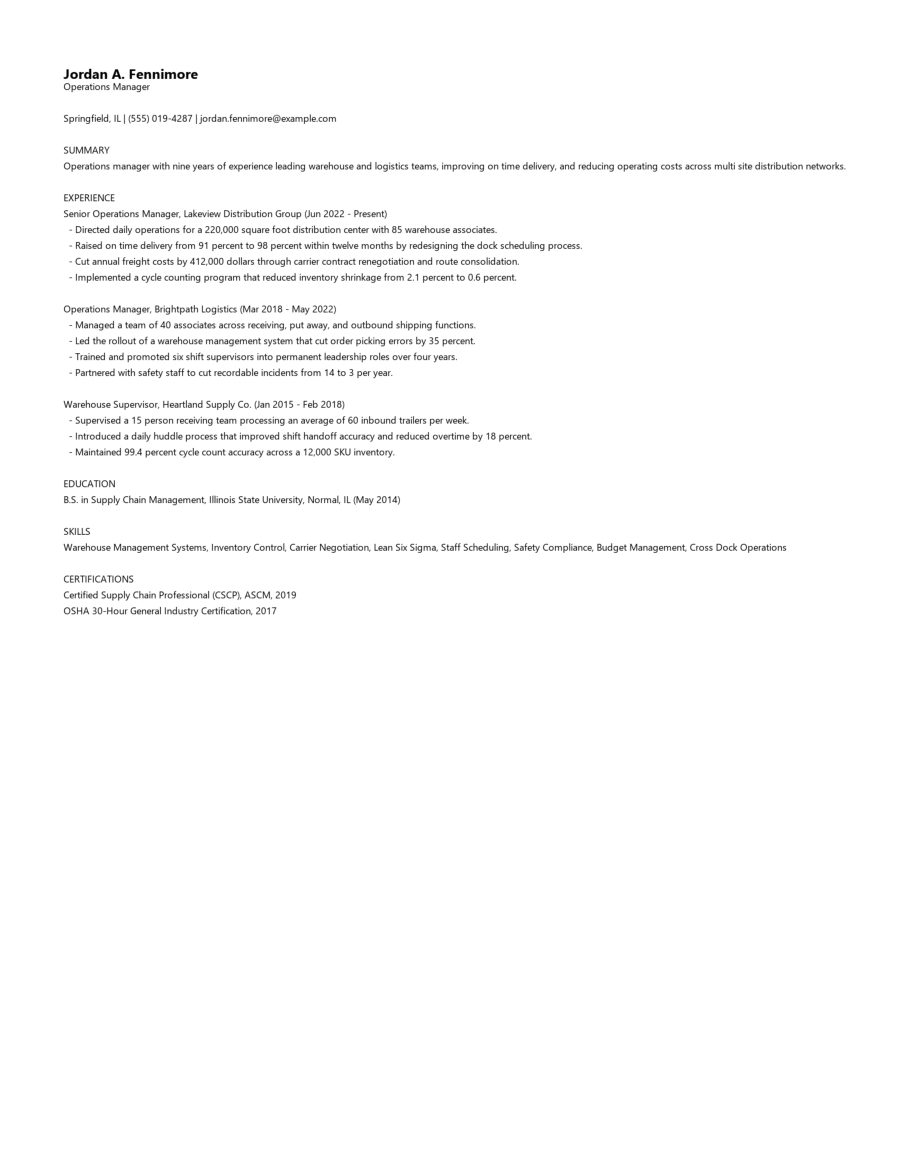
Visually a normal resume page. There is no text layer underneath it at all.
What every extractor returned
(empty output, 0 characters extracted)
See what actually comes out of your resume
Upload your resume and see the exact text a parser pulls out, line by line.
Our Own Default Template, Reported the Same Way
Our own app's default (table-based) resume template, archetype 15 in this study, is included and scored with the same metrics as every other layout, with no adjustment. All 5 headings were recovered by every extractor on both candidates, and content loss was zero. Heading order scored 0 percent for a specific, identified reason: our default template's conventional section order places Skills before Education, which differs from this study's reference order (Summary, Experience, Education, Skills, Certifications). That is a section-order convention, not lost or scrambled content: every heading is present and every word is recovered. We are reporting it exactly as measured rather than excluding our own template or holding it to a different bar than the other 19 layouts.
Median Reading-Order Similarity, by Layout
Sorted from worst to best by whichever of the Word or PDF version scored lower. Reading-order similarity compares the order lines actually came out in against the canonical reading order of the source resume, on a 0 to 1 scale. All 20 layouts, both formats where both exist.
Source: per-layout medians computed from results.csv in the downloadable study package. Three layouts (scanned image only, the design-tool-style two-column PDF, and the header-only non-Word PDF) exist only as a PDF in this study, so only one bar is shown for each.
What This Means for a Job Seeker
These findings are about what a text extractor can read out of a file, not about what gets a resume rejected. With that scope in mind, the layouts that tested cleanly in this study share a few traits:
- Headings and skill levels set as real text, not images. Anything baked into a picture scored zero recovery here regardless of what it said.
- Single-column or simple multi-section layouts over tables or floating text boxes, particularly for a sidebar holding contact information.
- A PDF exported from the same file as the Word version, where available. In this study most single-column layouts held up equally well in both formats, but table- and textbox-based layouts consistently scored worse in their PDF export than their source Word file.
- No assumption that a scanned or photographed resume will extract any text at all. It will not, unless the file has OCR applied before submission.
Limits
- These are five generic, open-source extraction libraries, poppler, pdfminer.six, python-docx, and docx2python, plus our own extraction engine. None of them is Workday, Greenhouse, Lever, iCIMS, or Taleo, and nothing in this study describes or implies any named ATS vendor's parsing behavior. A real ATS platform may use different libraries, different normalization, or OCR.
- Two synthetic candidates, two content shapes (three jobs versus two). One candidate's internship and project content exists in the underlying data but is not yet rendered into any layout archetype.
- The metrics are intentionally simple: substring and line-based matching, sequence similarity, and token-set differences. They are built to be easy to audit and rerun, not a simulation of a specific ATS's parsing logic.
- The design-tool-style PDF and the directly-built header-only PDF are original layouts built for this study. Neither reproduces, and neither should be read as representing, any specific named vendor's template.
- No real ATS platform was tested; those systems are closed and cannot be licensed or run for a study like this.
Frequently Asked Questions
Reproduce This Study
Download the full study package (zip, 109 files). It contains all 74 resume files, the two fictional candidate profiles, the generation and extraction scripts, the metric code, and the raw results: results.csv with one row per candidate, file, and extractor, plus the full extracted text from every extractor, our own engine included. The open-source half of the study reruns end to end from the README. Our engine's runs are included as recorded output, and you can run the same engine on any file yourself with the free /ats-resume-checker. Every number in this article traces back to a specific row in results.csv. The study package is shared for reuse with attribution.

Related Articles

How Resume Parsers Actually Work: Inside Workday, Greenhouse, Lever, iCIMS, Taleo
Side-by-side JSON output from Workday, Greenhouse, Lever, iCIMS, and Taleo on one identical resume. The 5-stage parser p...
Read More
Best ATS Resume Templates 2026: 8 Free Downloads
Get 8 free ATS-friendly resume templates as single-column Word files, plus the formatting checklist each one follows. Do...
Read More
ATS Friendly Resume Template (Engineer-Approved + Free Download)
Download an ATS friendly resume template engineered for real parser behavior. Includes a copy-paste structure, ATS-safe ...
Read More