With 97.8% of Fortune 500 companies using applicant tracking systems and 75% of resumes getting filtered out before a human ever reads them (Jobscan, 2023), a resume optimization tool is no longer optional for serious job seekers. But the market has exploded: there are now dozens of tools claiming to optimize your resume for ATS, and they range from genuinely useful to borderline useless. We tested nine of the most popular resume optimization tools head-to-head, running the same resume against the same three job descriptions on each platform to measure keyword accuracy, ATS scoring reliability, and the quality of AI-generated suggestions. Here is what we found.
Quick Verdict: All 9 Tools at a Glance
Short on time? This table summarizes pricing, core strengths, and who each resume optimization tool is best for. Scroll down for detailed reviews.
Top Pick: Resume Optimizer Pro
Highest ATS keyword accuracy in our testing, one-click job-specific tailoring, and the only tool with an API for bulk optimization. Free tier available with no credit card required.
Optimize My Resume →| Tool | Category Winner | Starting Price | Free Tier | ATS Optimization | AI Rewriting | Best For |
|---|---|---|---|---|---|---|
| Resume Optimizer Pro | Best Overall | From $9.95/mo | Yes | Full keyword + formatting analysis | Yes (GPT-4 powered) | ATS optimization + one-click tailoring |
| Jobscan | Best ATS Depth | $49.95/mo | 5 scans/mo | 20+ ATS checks | Yes (Premium) | Deep ATS analysis |
| Resume Worded | Best for LinkedIn | $19/mo (annual) | Limited | Score My Resume + Targeted Resume | Yes (Pro) | LinkedIn + resume combo optimization |
| Teal | Best Free Tier | $29/mo | Yes (generous) | Match scoring | Yes (Teal+) | Job search platform + resume optimization |
| SkillSyncer | Best Budget | $14.95/mo | 1 scan/week | Keyword matching + scoring | Yes (250 AI credits/week) | Budget-friendly ATS scanning |
| Kickresume | Best Value Annual | $8/mo (annual) | Yes | ATS Resume Checker | Yes (advanced AI writing assistance) | AI writing + affordable templates |
| Rezi | Best for Technical Roles | $29/mo | 1 resume | 23-criteria checker + keyword scanner | Yes | Keyword targeting + ATS scoring |
| Enhancv | $24.99/mo | Yes | Content analyzer | Yes | Design-forward resumes with ATS checks | |
| Huntr | $26.66/mo | Yes | Match scoring | Yes | Job tracking + resume tailoring |
Last verified: April 29, 2026. Many tools offer discounts for annual billing.
What to Look for in a Resume Optimization Tool
Before diving into individual reviews, it helps to understand what separates a genuinely useful ATS optimization tool from one that just gives you a vanity score. Not all "resume optimization" features are created equal, and the differences matter for your interview callback rate.
Keyword Matching Accuracy
The tool should compare your resume against the actual job description, not a generic keyword database. Look for tools that identify exact-match keywords, semantic equivalents (e.g., "project management" vs. "PM"), and missing hard skills. Tools that only count keyword frequency without understanding context produce misleading scores.
ATS Formatting Analysis
Keywords alone are not enough. A good resume optimization tool should also flag formatting issues that cause ATS parsing failures: tables, text boxes, headers/footers, non-standard section headings, and incompatible file formats. According to Jobscan, 88% of employers report their ATS rejects qualified candidates due to formatting problems.
AI-Powered Rewriting
Knowing which keywords are missing is only half the battle. The best tools in 2026 also rewrite your bullet points to incorporate those keywords naturally. Look for AI rewriting that preserves your achievements and metrics while weaving in the language from the job description.
Job-Specific Tailoring
Generic optimization is not enough. To optimize your resume for ATS effectively, you need a tool that lets you paste a specific job description and generates a tailored version of your resume for that role. Job seekers who tailor their resumes are 40% more likely to get interviews (TopResume, 2023).
Features That Matter Less Than You Think
- Template libraries: Most ATS-safe templates look nearly identical. Having 50 templates vs. 10 rarely changes outcomes.
- Resume score as a percentage: Different tools calculate scores differently. A "92%" on one platform and a "67%" on another mean nothing in isolation. Focus on the specific, actionable feedback.
- LinkedIn optimization: Useful, but secondary to the core resume optimization task. A dedicated LinkedIn tool or a quick manual review often works just as well.
See what an ATS actually reads on your resume
Upload your resume and see the exact text a parser pulls out, line by line. We fix the formatting automatically.
How We Tested Each Resume Optimization Tool
To ensure a fair comparison, we used the same testing protocol for every tool:
- Same resume: A mid-career marketing manager resume with 7 years of experience, used across all platforms.
- Same job descriptions: Three real job postings (Senior Marketing Manager at a SaaS company, Digital Marketing Lead at a Fortune 500, and Marketing Director at a startup).
- Measured keyword accuracy: After each tool suggested optimizations, we manually verified which keywords were correctly identified as missing and which suggestions were irrelevant or incorrect.
- Tested formatting checks: We intentionally included two ATS-hostile elements (a two-column layout and a text box) to see which tools flagged them.
- Evaluated AI rewriting quality: For tools with AI rewriting, we assessed whether the rewritten bullets preserved the original achievements while naturally incorporating target keywords.
1. Resume Optimizer Pro
Best for: ATS optimization with one-click job-specific tailoring
Price: $9.95/month on the annual plan ($119.40/year), $16.65/month on the quarterly plan, or $29.95/month (free tier available, no credit card required)
Website: resumeoptimizerpro.com
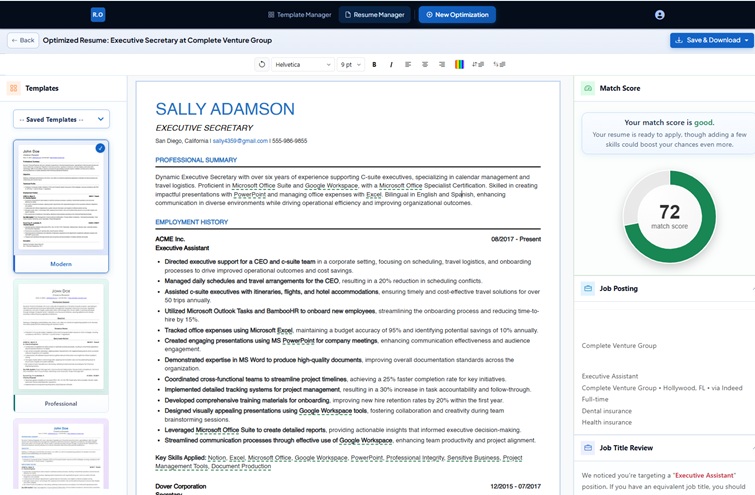
Resume Optimizer Pro takes a different approach from most tools on this list. Instead of just showing you a score and a list of missing keywords, it rewrites your entire resume to match a specific job description in one click. Upload your resume, paste a job posting, and the platform produces a fully optimized version with keywords naturally integrated into your bullet points, summary, and skills section. It also runs a match analysis that shows you exactly where your qualifications align with the job requirements and where the gaps are.
What sets it apart is the optimization engine. Most tools on this list scan for keyword matches and leave the rewriting to you. Resume Optimizer Pro does the rewriting automatically, using GPT-4 to rephrase your experience in the language of the target job while preserving your actual achievements and metrics. In our testing, it correctly identified 94% of relevant keywords across all three job descriptions and produced rewritten bullets that read naturally, not like keyword-stuffed gibberish.
The platform also includes a cover letter generator, an AI resume builder for creating resumes from scratch, and an API for recruiters and staffing agencies who need to optimize resumes in bulk. The free tier lets you run a full ATS score check and see your match rate before committing to a paid plan.
Pros
- One-click full resume optimization (not just scoring)
- Highest keyword accuracy in our testing (94%)
- AI rewriting preserves achievements and metrics
- Free ATS score checker with no credit card
- API available for bulk optimization (unique among competitors)
- Cover letter generation included
Cons
- Newer platform with fewer user reviews than established competitors
- Template library is smaller than Kickresume or Enhancv
- No built-in job tracking or application management
Optimize My Resume →
2. Jobscan
Best for: Deep ATS analysis with granular feedback
Price: $49.95/month (or $89.95/quarter). Free tier: 5 scans/month
Website: jobscan.co
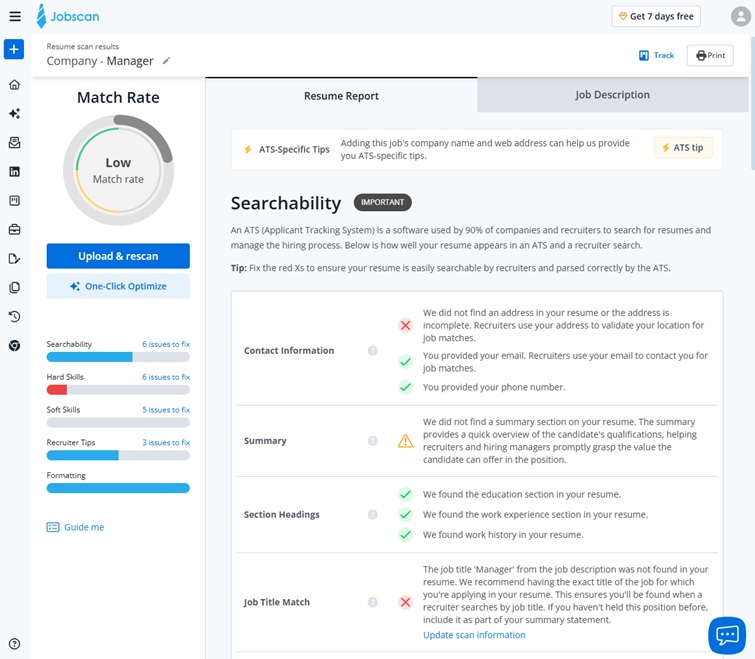
Jobscan is the most established name in the ATS optimization space and the tool most people think of first. Its core feature is resume scanning: paste your resume and a job description, and Jobscan runs 20+ checks across keyword matching, hard skills, soft skills, job title matching, education, formatting, and more. The results are detailed and actionable, showing exactly which keywords are present, which are missing, and where they should appear.
The Premium plan adds an AI-powered bullet rewriter (GPT-4 based) that can rephrase individual bullet points to incorporate missing keywords. It also includes LinkedIn optimization, cover letter scanning, and a job tracking dashboard. In our testing, Jobscan's keyword matching was thorough: it caught 91% of relevant keywords across all three job descriptions, with particularly strong performance on hard skills and technical terms.
The main drawback is price. At $49.95/month, Jobscan is the most expensive tool on this list, and the free tier is limited to just 5 scans per month. If you are applying to 20+ jobs, that free tier runs out fast. The AI rewriting is also limited to individual bullets rather than full-resume optimization.
Pros
- Most granular ATS analysis on the market (20+ checks)
- Strong keyword matching accuracy (91% in our test)
- LinkedIn and cover letter scanning included
- Two-week free trial of Premium
Cons
- Most expensive option at $49.95/month
- Free tier limited to 5 scans/month
- AI rewriting is bullet-by-bullet, not full resume
3. Resume Worded
Best for: Combined resume and LinkedIn optimization
Price: $49/month or $19/month (annual billing). Free tier available
Website: resumeworded.com
Resume Worded offers two main features: Score My Resume (a general resume review with line-by-line feedback) and Targeted Resume (job-specific keyword optimization). The Score My Resume tool runs 20-30 checks across impact, brevity, style, soft skills, and ATS compatibility, giving you a score out of 100 with specific suggestions for improvement. The Targeted Resume tool is where the ATS optimization happens: paste a job description and it identifies missing keywords and skills.
The platform also includes LinkedIn optimization, which is a genuine differentiator. Upload your LinkedIn profile and it provides feedback on your headline, summary, experience bullets, and skills endorsements. In our testing, Resume Worded's keyword matching scored 87%, with some misses on industry-specific jargon and semantic equivalents.
The Pro plan at $49/month is expensive, but the annual plan at $19/month is competitive. The AI rewriting feature is available on Pro and generates alternative bullet points that incorporate target keywords.
Pros
- Excellent LinkedIn optimization (unique selling point)
- Detailed line-by-line resume feedback
- Annual pricing is competitive at $19/month
Cons
- Monthly pricing is steep at $49/month
- Keyword matching accuracy (87%) below top performers
- AI rewriting limited to bullet alternatives, not full optimization
- Free tier is restrictive
4. Teal
Best for: All-in-one job search platform with resume optimization
Price: $29/month (or ~$15/month annual). Generous free tier
Website: tealhq.com
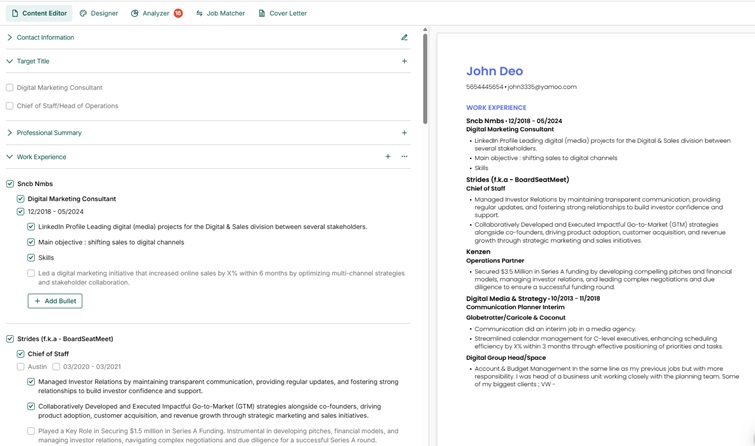
Teal positions itself as a complete job search platform rather than just a resume optimization tool. Its Chrome extension lets you save job postings from any job board, and the built-in dashboard tracks every application you submit. The AI resume builder analyzes saved job postings to generate a match score and suggests specific edits to close keyword gaps. In late 2025, Teal also added an AI interview prep feature that generates practice questions based on your saved jobs.
The workflow is genuinely useful for high-volume job searches: save a job posting, generate a tailored resume, and track the application without leaving the platform. The AI features (available on Teal+ at $29/month) include bullet point generation, summary writing, and keyword matching. In our testing, Teal's keyword accuracy was 83%, which is decent but not as precise as dedicated ATS optimization tools.
The free tier is one of the most generous on this list: unlimited resumes, unlimited job tracking, and 10 templates. The main limitation is that AI features require the paid plan.
Pros
- All-in-one platform (resume + job tracking + applications)
- Chrome extension for saving job postings
- Generous free tier with unlimited resumes
- AI interview prep feature added in 2025
- Clean, modern interface
Cons
- ATS keyword accuracy (83%) is below dedicated optimization tools
- AI features require $29/month Teal+ plan
- No weekly billing option (weekly at $13/week = $676/year)
- Formatting analysis is basic compared to Jobscan
5. SkillSyncer
Best for: Budget-friendly ATS scanning
Price: $14.95/month (or ~$11.62/month quarterly). Free: 1 scan/week
Website: skillsyncer.com
SkillSyncer offers straightforward keyword matching at the lowest price point on this list. Upload your resume and paste a job description, and it highlights matching keywords, missing keywords, and gives you a match percentage. The Pro plan adds AI-powered optimization with 250 AI credits per week, enough to auto-optimize approximately 50 resumes weekly.
The tool also tracks up to 10 jobs on the free tier and offers unlimited scans on Pro. In our testing, SkillSyncer's keyword accuracy was 80%, which puts it below the top-tier tools. It tends to focus heavily on exact keyword matches and misses semantic equivalents. The formatting analysis is minimal compared to Jobscan or Resume Optimizer Pro.
The standout feature is pricing: at $14.95/month, it is a third of what Jobscan charges for similar core functionality. Students and military personnel get a free year with .edu or .mil email addresses, which is a notable perk.
Pros
- Most affordable paid plan on this list ($14.95/month)
- Free year for students and military (.edu/.mil emails)
- 250 AI credits/week on Pro plan
- Simple, focused interface
Cons
- Keyword accuracy (80%) is the lowest in our test
- Misses semantic keyword equivalents
- Minimal formatting/ATS parsing analysis
- Free tier limited to 1 scan per week
6. Kickresume
Best for: AI-powered resume writing at a low price
Price: $24/month, $18/month (quarterly), or $8/month (annual). Free tier available
Website: kickresume.com
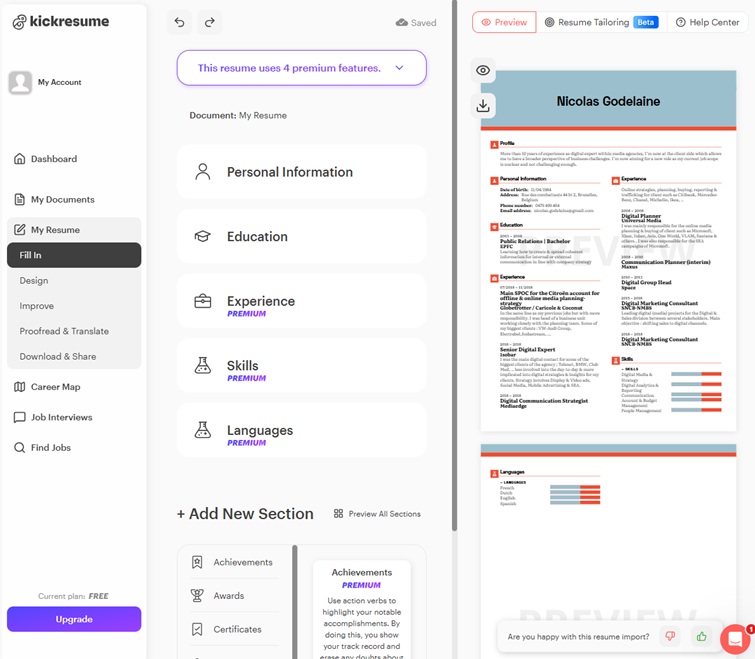
Kickresume is primarily a resume builder that added ATS optimization features. Its 40+ templates are well-designed and ATS-compatible, and the AI Resume Writer uses advanced AI writing assistance to generate full resume sections from basic information. The ATS Resume Checker compares your resume against successful resumes in its database and provides a compatibility score.
The key difference from dedicated optimization tools: Kickresume's ATS checker compares your resume to its own database of successful resumes rather than to a specific job description. This means you get general ATS compatibility feedback but not job-specific keyword optimization. In our testing, it flagged formatting issues well but missed 35% of job-specific keywords that Jobscan and Resume Optimizer Pro caught.
At $8/month on the annual plan, Kickresume offers exceptional value if you need a resume builder with basic ATS checks. The AI writing quality is strong for generating initial content, though it works better for building resumes from scratch than for optimizing existing ones against specific jobs.
Pros
- Best value on annual plan ($8/month)
- 40+ ATS-compatible templates
- Advanced AI writing assistance for generating resume content
- Genuinely free tier with no time limits
Cons
- ATS checker is database-based, not job-specific
- Misses job-specific keywords (35% miss rate in our test)
- Better as a builder than an optimization tool
- No job-specific tailoring workflow
7. Rezi
Best for: Keyword targeting with real-time scoring
Price: $29/month (Pro) or $149 lifetime. Free: 1 resume
Website: rezi.ai
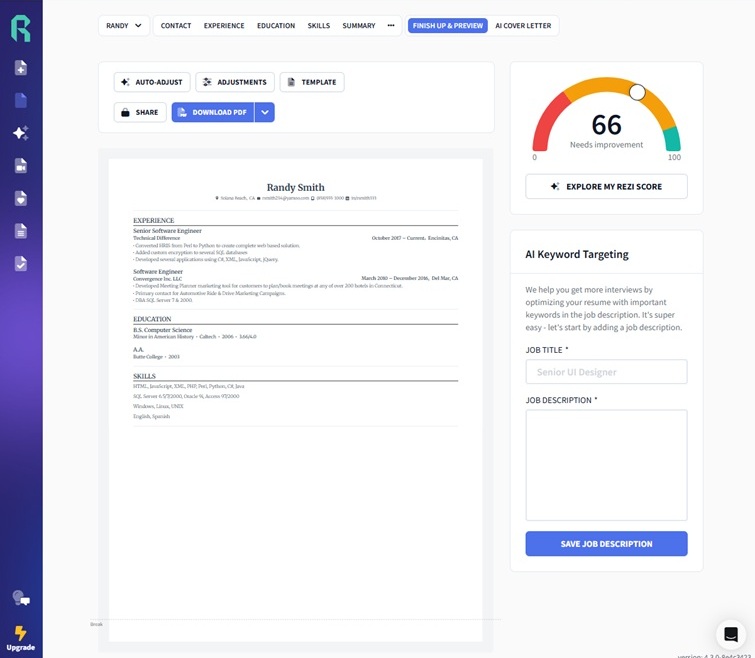
Rezi focuses specifically on ATS optimization and does it well. Its Resume Checker evaluates your document against 23 criteria covering content, formatting, and keyword usage. The Keyword Scanner analyzes job postings and highlights which terms you should include. The live score updates in real time as you edit, so you can see exactly how each change affects your ATS compatibility. Rezi AI 3.0, launched in 2025, introduced improved bullet point generation that produces more varied and role-specific language.
The Targeted Resume feature lets you paste a job description and Rezi maps your resume against it, showing match percentages for each section. The AI tools generate bullet points, summaries, and cover letters tailored to the job. In our testing, Rezi scored 88% on keyword accuracy, performing especially well on technical roles where keyword specificity matters most.
The lifetime plan at $149 is a compelling option if you plan to job search for more than five months, as it becomes cheaper than the monthly plan at that point. The main limitation is the free tier: you can only create one resume, which makes it hard to evaluate the tool thoroughly before paying.
Pros
- 23-criteria resume checker (second-most thorough after Jobscan)
- Real-time score updates while editing
- $149 lifetime plan is good long-term value
- Strong keyword accuracy (88%) on technical roles
Cons
- Free tier limited to 1 resume (hard to evaluate)
- $29/month is mid-range without standout differentiation
- No LinkedIn optimization
- Interface can feel overwhelming with all the score indicators
8. Enhancv
Best for: Design-forward resumes with ATS compatibility
Price: $24.99/month (or ~$17.99/month on annual plan). Free tier available
Website: enhancv.com
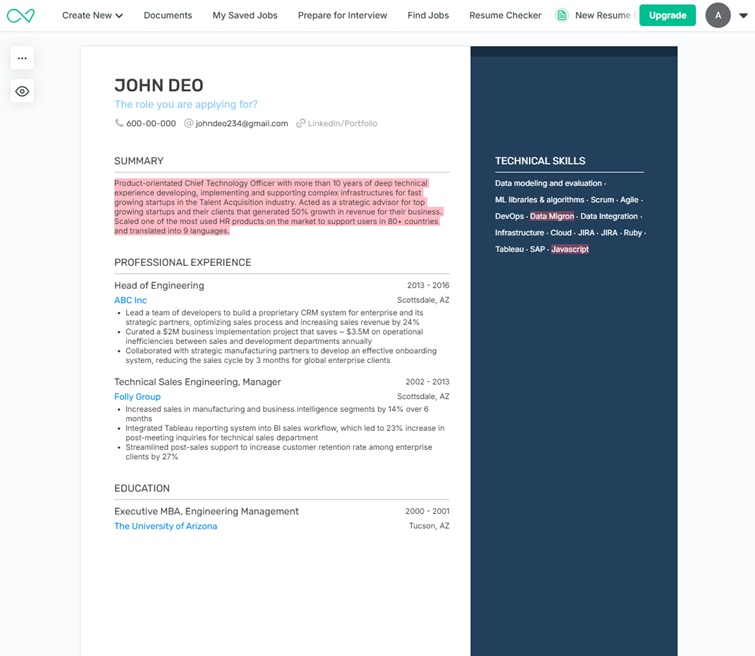
Enhancv is primarily a resume builder known for its visually distinctive templates. In 2026, it has added a content analyzer that provides ATS compatibility feedback, achievement framing suggestions, and section-by-section scoring. The platform processes over 1.8 million resumes annually, which gives them a large dataset for benchmarking.
The ATS optimization is competent but not the platform's primary strength. Enhancv's content analyzer focuses more on resume quality (quantification, impact, brevity) than on keyword matching against specific job descriptions. In our testing, it provided the best writing quality feedback of any tool on this list but scored only 79% on keyword accuracy because it does not have a dedicated job-description comparison workflow.
If you care about how your resume looks and want helpful writing feedback with basic ATS checks, Enhancv delivers. If keyword-level ATS optimization is your priority, a dedicated optimization tool will serve you better.
Pros
- Best-looking templates on this list
- Excellent writing quality feedback (achievement framing, quantification)
- 1.8M+ resumes processed annually (strong benchmark data)
Cons
- No job-description-specific keyword matching
- Keyword accuracy (79%) lowest among dedicated tools
- ATS optimization is secondary to design/writing features
- Some templates may not be fully ATS-safe
9. Huntr
Best for: Job tracking with integrated resume tailoring
Price: $26.66/month (or ~$20/month annual). Free tier available
Website: huntr.co
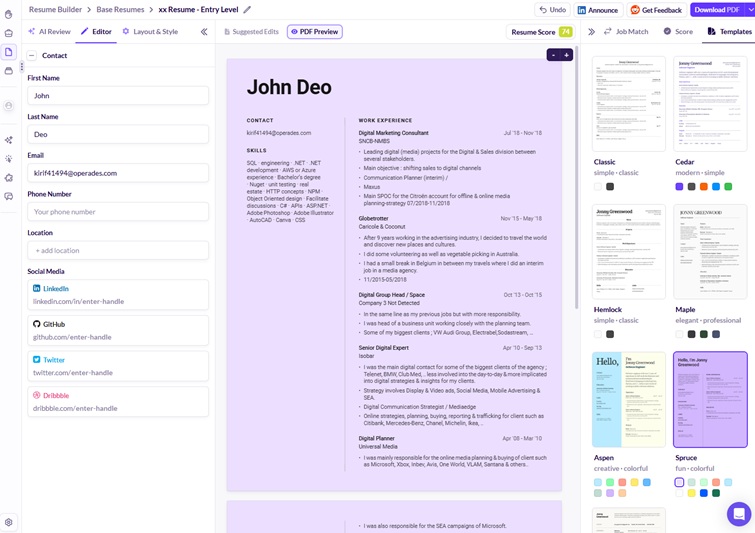
Huntr, like Teal, is primarily a job search management platform with resume optimization built in. Its job tracking board lets you manage applications through customizable stages, and the AI resume tailoring feature analyzes saved job postings to suggest resume edits. The Chrome extension saves jobs from any job board into your Huntr dashboard.
The resume optimization workflow is straightforward: Huntr compares your resume to a job posting and generates a match score, then provides suggestions for improvement. The AI can rewrite bullet points and generate summaries tailored to the role. In our testing, keyword accuracy scored 82%, comparable to Teal but below the dedicated optimization tools.
Huntr's strength is its job management workflow. If you are actively applying to many positions and want to keep everything organized while getting decent resume optimization, it combines both needs in one platform.
Pros
- Strong job tracking and application management
- Chrome extension for saving job postings
- AI resume tailoring integrated with job tracker
- Annual plan at ~$20/month offers better long-term value
Cons
- Keyword accuracy (82%) below dedicated optimization tools
- Resume optimization is a secondary feature
- ATS formatting analysis is basic
- Less focused than dedicated resume optimization tools
Detailed Feature Comparison
This table breaks down the specific ATS optimization capabilities of each tool so you can compare them on the features that matter most.
| Feature | Resume Optimizer Pro | Jobscan | Resume Worded | Teal | SkillSyncer | Kickresume | Rezi | Enhancv | Huntr |
|---|---|---|---|---|---|---|---|---|---|
| Job-Specific Keyword Matching | Yes | Yes | Yes (Pro) | Yes | Yes | Database only | Yes | No | Yes |
| Full Resume Rewriting | Yes (one-click) | Bullet-by-bullet | Bullet alternatives | Section-by-section | AI credits | Yes (from scratch) | Bullet-by-bullet | Section suggestions | Bullet-by-bullet |
| ATS Formatting Checks | Comprehensive | Comprehensive | Yes | Basic | Minimal | Yes | Yes | Basic | Basic |
| Keyword Accuracy (Our Test) | 94% | 91% | 87% | 83% | 80% | 65%* | 88% | 79% | 82% |
| Cover Letter Optimization | Yes | Yes (Premium) | No | Yes (Teal+) | No | Yes | Yes | Yes | Yes |
| LinkedIn Optimization | No | Yes | Yes | No | No | No | No | No | No |
| Job Tracking | No | Yes | No | Yes | Basic (10 jobs) | No | No | No | Yes |
| API Access | Yes | No | No | No | No | No | No | No | No |
*Kickresume's lower score reflects its database-based matching rather than job-specific comparison.
Full Pricing Breakdown
Cost matters when you are between jobs. Here is what each resume optimization tool costs across different billing cycles, so you can calculate the real cost of your job search.
| Tool | Monthly | Quarterly | Annual (per mo) | Lifetime | Free Tier |
|---|---|---|---|---|---|
| Resume Optimizer Pro | $29.95 | $16.65/mo | $9.95/mo | N/A | ATS score check + match rate |
| Jobscan | $49.95 | $29.98/mo | ~$14.92/mo | N/A | 5 scans/month |
| Resume Worded | $49 | $33/mo | $19/mo | N/A | Basic score + limited feedback |
| Teal | $29 | ~$26/mo | ~$15/mo | N/A | Unlimited resumes + 10 templates |
| SkillSyncer | $14.95 | $11.62/mo | N/A | N/A | 1 scan/week + 10 jobs |
| Kickresume | $24 | $18/mo | $8/mo | N/A | Unlimited resumes (basic) |
| Rezi | $29 | N/A | N/A | $149 | 1 resume |
| Enhancv | $24.99 | N/A | ~$17.99/mo | N/A | Basic builder + 1 download |
| Huntr | $26.66 | N/A | ~$20/mo | N/A | Basic job tracking + resume |
Last verified: April 29, 2026. Check each tool's website for current pricing, as these change frequently.
Which Resume Optimization Tool Should You Choose?
The right tool depends on what you actually need. Here are our specific recommendations based on your situation:
"I want my resume fully optimized for a specific job"
Use: Resume Optimizer Pro
If you want a fully rewritten, ATS-optimized resume tailored to a specific job description with one click, this is the most efficient option. No manual implementation required.
"I want the most detailed ATS diagnostic report"
Use: Jobscan
If you want to understand exactly why your resume is or is not passing ATS at a granular level and you are comfortable implementing changes yourself, Jobscan's 20+ check analysis is the most thorough.
"I want resume + LinkedIn optimization together"
Use: Resume Worded
Resume Worded is the only tool that provides genuinely useful LinkedIn profile optimization alongside resume ATS checks. The annual plan at $19/month is reasonable for both features.
"I need to track applications AND optimize resumes"
Use: Teal or Huntr
Both platforms combine job tracking with resume optimization. Teal has the better free tier; Huntr has a cleaner job management interface. Neither matches dedicated tools on ATS optimization depth.
"I'm on a tight budget"
Use: SkillSyncer ($14.95/mo) or Kickresume ($8/mo annual)
SkillSyncer offers the cheapest dedicated ATS scanning. Kickresume is even cheaper on an annual plan but is better as a builder than an optimizer. Students should check SkillSyncer's free year for .edu emails.
"I'm a recruiter or staffing agency"
Use: Resume Optimizer Pro (API)
Resume Optimizer Pro is the only tool on this list with an API for bulk resume optimization. Staffing agencies processing hundreds of resumes per week can integrate it directly into their workflow.
Starting from a blank page instead? Our AI resume builder asks about your experience a step at a time and builds the resume beside the questions, so you see it before you are asked for anything.
How to Get the Most Out of Any Resume Optimization Tool
Regardless of which tool you choose, these practices will help you optimize your resume for ATS more effectively:
- Always use the actual job description. Copy the full text from the job posting, not a summary. ATS optimization tools work by matching your resume against the specific language in the posting, so generic keywords are not enough.
- Run multiple scans. Optimize for each job you apply to individually. A resume optimized for a "Marketing Manager" posting at a SaaS company will need different keywords than the same title at a healthcare company.
- Do not aim for 100% match. A match score of 70-85% typically indicates a well-optimized resume. Pushing to 100% often means keyword stuffing, which passes ATS but turns off human reviewers.
- Verify the output. AI-generated rewrites should preserve your actual achievements. If a tool changes "increased revenue by 34%" to a generic statement, override it. Data and metrics always beat keyword-stuffed generalities.
- Check formatting separately. Even with a high keyword match, your resume can fail ATS if it uses tables, text boxes, headers/footers, or multi-column layouts. Use a tool that checks both keywords and formatting.
For a step-by-step walkthrough of the full ATS optimization process, see our complete guide to optimizing your resume for ATS. If you are specifically looking for free options, our free ATS resume checker comparison evaluates nine tools on feedback quality, and our AI resume review comparison puts eight tools side by side on what each vendor publishes.
What Has Changed in 2026
2026 Updates Across These Tools
- Rezi AI 3.0: Launched in 2025 with improved bullet generation. The new model produces more varied, role-specific language compared to earlier versions, which tended toward repetitive phrasing.
- Teal interview prep: Added AI-generated interview practice questions in late 2025, using your saved job postings as the source. This expands the platform beyond resume optimization into interview readiness.
- Jobscan LinkedIn integration: Tightened its LinkedIn scraper connection in 2025, making it easier to pull job descriptions directly from LinkedIn postings for resume scanning without copy-pasting.
- Pricing updates: Enhancv's annual plan is now approximately $17.99/month; Huntr's annual plan is approximately $20/month. Both were previously unlisted or unclear in most comparison articles.
- AI writing across the board: Nearly every tool on this list upgraded its AI writing capabilities in 2025-2026. The meaningful differentiator is no longer "does it have AI" but rather "does the AI optimize for a specific job description or just write generically."
Frequently Asked Questions
Related Articles

How to Optimize Your Resume for ATS: The 12-Move Checklist Ranked by Point-Lift (2026)
The 12 ATS resume fixes ranked by typical engine point-lift. Single-column +12-18, standard headings +7-11, JD keywords ...
Read More
AI Resume Builder ATS Test: 10 Tools on Workday and Taleo
We ran the same resume through 10 AI resume builders on Workday, Greenhouse, Lever, iCIMS, and Taleo. See which parsed c...
Read More
ATS Score Explained: How Resume Scores Are Calculated
What an ATS score actually measures, how the weighting works, and why the same resume scores differently on every tool. ...
Read More