A resume checker has one job before anything else: tell you when an applicant tracking system will misread your file. We picked three resumes whose layouts break plain text extraction and ran each through Enhancv's free resume checker and through our own ATS resume checker on November 3, 2026. Enhancv rated all three "No issues" for ATS parsing. Our checker found 21, 12, and 19 parsing problems in the same files. Then we rebuilt the research CV in Enhancv's own template, which it labels "ATS-tested", and our checker found 30. Rebuilt by our optimizer, the same CV had 0.
Results at a glance
| Test file | Layout problem | Enhancv ATS Parse Rate | Resume Optimizer Pro |
|---|---|---|---|
| Sidebar template | Tinted left sidebar beside the work history | "No issues", score 80/100 | 21 parsing issues, 4 headings affected |
| Executive two-column | Skills column beside the summary | "No issues", score 72/100 | 12 parsing issues |
| Research CV | Expertise column beside the research bullets | 76/100, ATS Parse Rate "No issues" | 19 parsing issues |
| Research CV in Enhancv's template | Summary and skills column beside the experience | Not run | 30 parsing issues |
| Research CV rebuilt by our optimizer | Default single column template | Not run | 0 parsing issues |
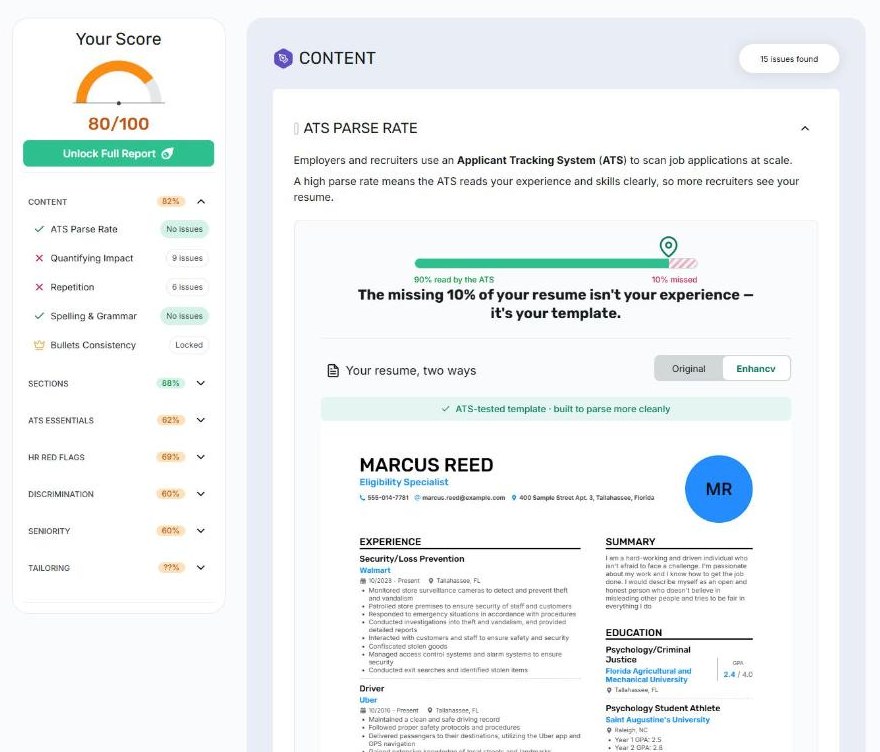
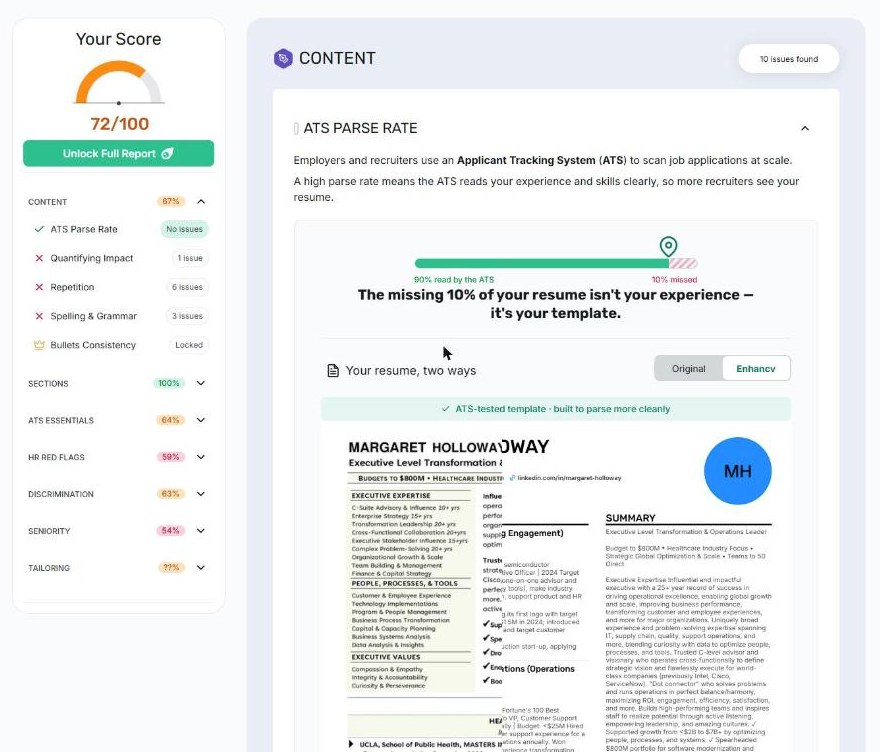
All three Enhancv reports showed the same bar, "90% read by the ATS, 10% missed", and the same sentence under it, even though the three layouts break in different places.
How we ran the test
- Files: three real resumes from people who use our service, anonymized with fake names, contact details, and references. Layouts, fonts, and body text are unchanged, so each file breaks the way the original did.
- Enhancv: the free checker at enhancv.com/resources/resume-checker, signed in to a free account.
- Resume Optimizer Pro: the free checker at /ats-resume-checker, no account.
- What we recorded: each tool's parsing verdict, screenshots, and the text each tool displayed.
Download the same files and run them through both checkers to repeat the test:
- sample-sidebar-template.pdf
- sample-executive-two-column.pdf
- sample-canva-research-cv.pdf
- sample-research-cv-enhancv-template.pdf (the research CV exported from Enhancv)
- sample-research-cv-optimized.docx (the research CV rebuilt by our optimizer)
Test 1: the sidebar template
A common builder template: name, contact details, education, and skills in a tinted sidebar on the left; summary and work history on the right. The city in the address wraps mid-word across two lines, "Ta" and "llahassee".
Enhancv: score 80/100, ATS Parse Rate "No issues". Its "Your resume, two ways" preview shows a clean, reordered resume: the split city is joined back into "Tallahassee", "problemsolving" becomes "problem solving", jobs are sorted newest first, and a "/ 4.0" scale appears next to each GPA, though the file never states one. It listed Experience, Education, and Summary as the sections it found; Skills was not among them.
Resume Optimizer Pro: 21 parsing issues, with all four section headings affected. A parser reads straight across the page, so the first name shares a line with CAREER OBJECTIVE, the last name lands inside the summary, and the address shares lines with the work history:
MARCUS                         CAREER OBJECTIVE
                               I am a hard-working and driven individual ...
REED                           challenge. I'm passionate about my work ...
400 Sample Street Apt. 3, Ta   Maintained a clean and safe driving record
llahassee, Florida             Followed proper safety protocols and procedures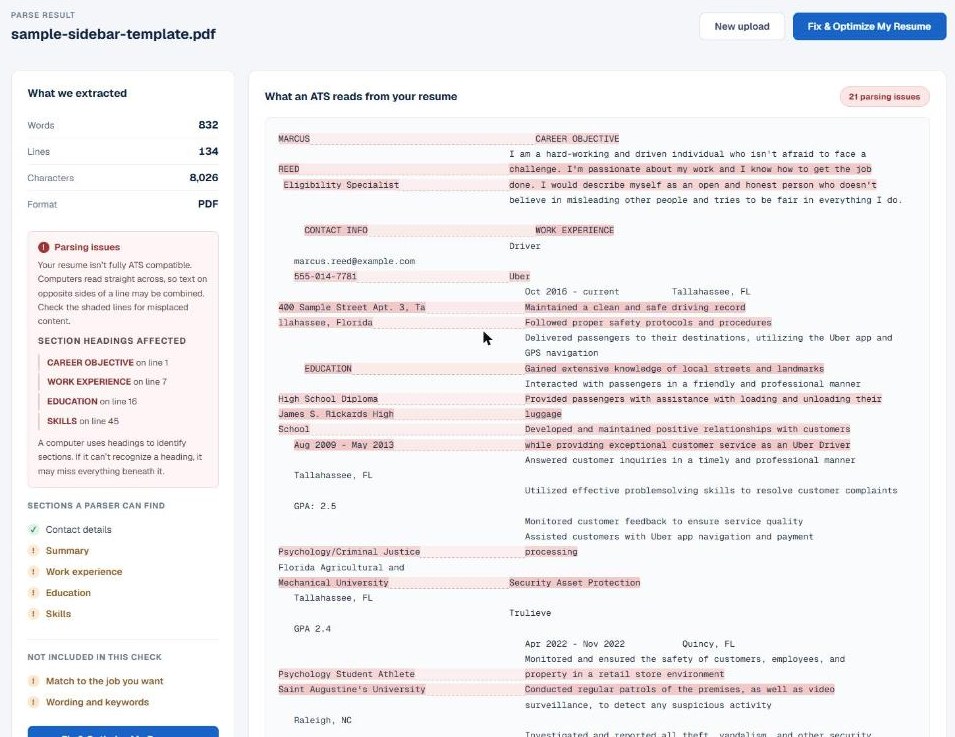
Test 2: the executive two-column resume
A three-page executive resume built in Word, with a shaded skills column left of the summary and a contact block right of the name.
Enhancv: score 72/100, ATS Parse Rate "No issues", with the same 90% bar as Test 1. Its spelling check flagged "projekts" three times, suggesting "projects" or "crickets". That word does not appear in the file; we searched its extracted text to confirm. Its preview also changed the headline under the name to "Strategic Advisor to the CEO" and added a GPA scale and a 2024 date to a degree still in progress.
Resume Optimizer Pro: 12 parsing issues. The skills column and the summary come out interleaved, so skill names land between the lines of a paragraph:
Enterprise Strategy 15+ yrs      performance, transforming customer and employee experiences
Organizational Growth & Scale    Trusted C-level advisor and visionary who operates
Finance & Capital Strategy       strategic vision and flawlessly execute for world-class companies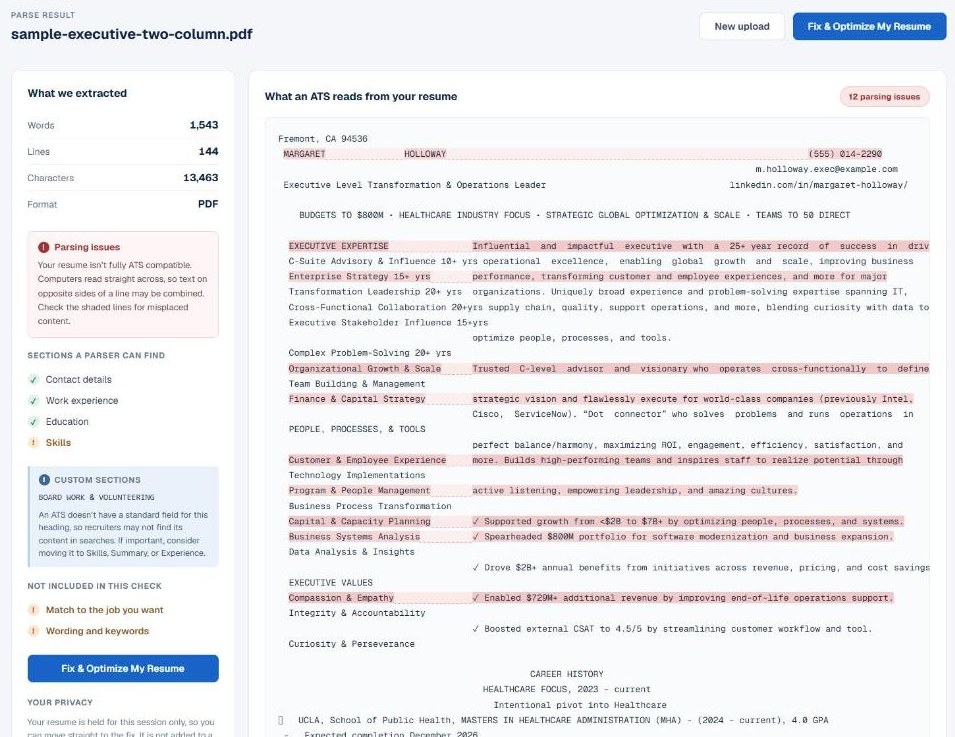
Test 3: the research CV
A two-page Canva CV with a technical expertise column right of the research experience.
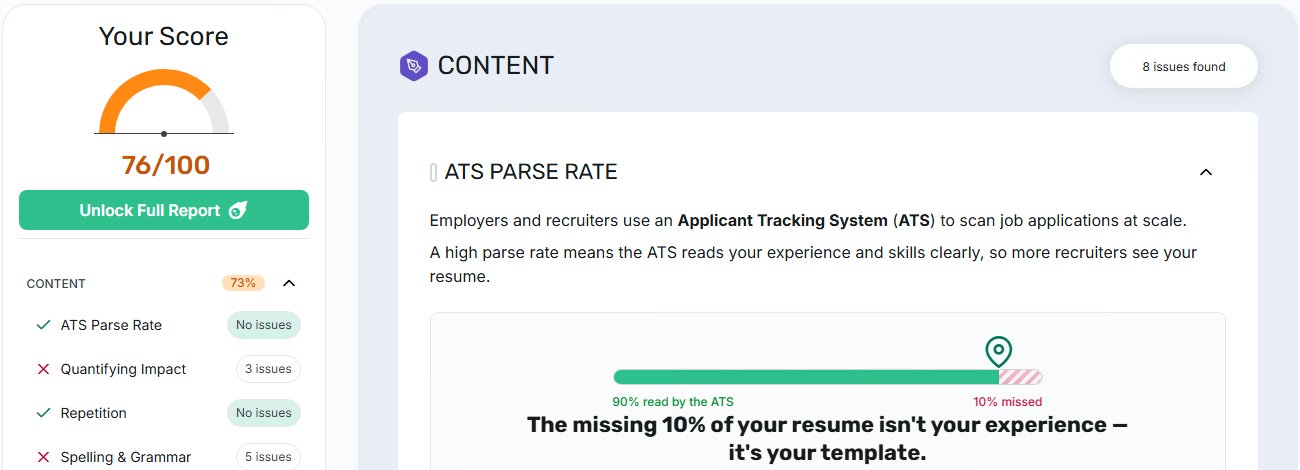
Enhancv: score 76/100, ATS Parse Rate "No issues", with the same 90% bar as Tests 1 and 2. Its findings were about content: 3 bullets without numbers and 5 spelling issues. The report came from a second free account, because the first showed "You've run out of free reports" after two checks.
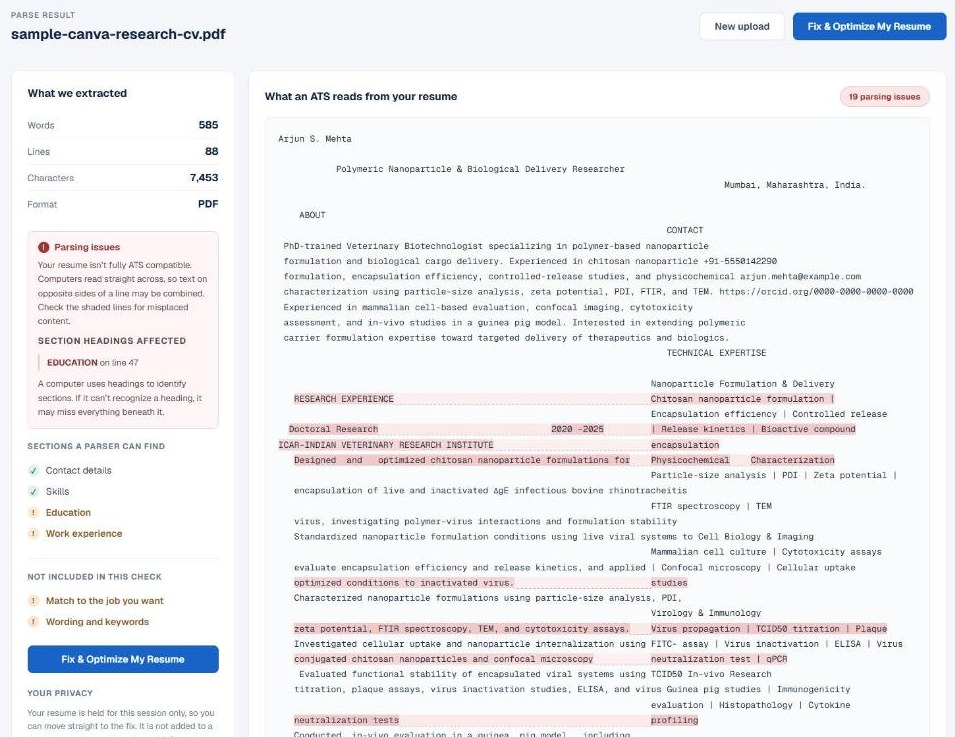
Resume Optimizer Pro: 19 parsing issues. Research bullets share lines with headings from the right column, for example "Designed and optimized chitosan nanoparticle formulations for" beside "Physicochemical Characterization". Work experience and Education were not found as standard sections.
Bonus test: Enhancv's template vs ours
We imported the research CV into Enhancv and exported it with the default template. Enhancv presents that template as built for applicant tracking systems: its editor banner reads "ATS-tested template · built to parse more cleanly", and the exported PDF's producer field reads "ATS-friendly template by Enhancv".
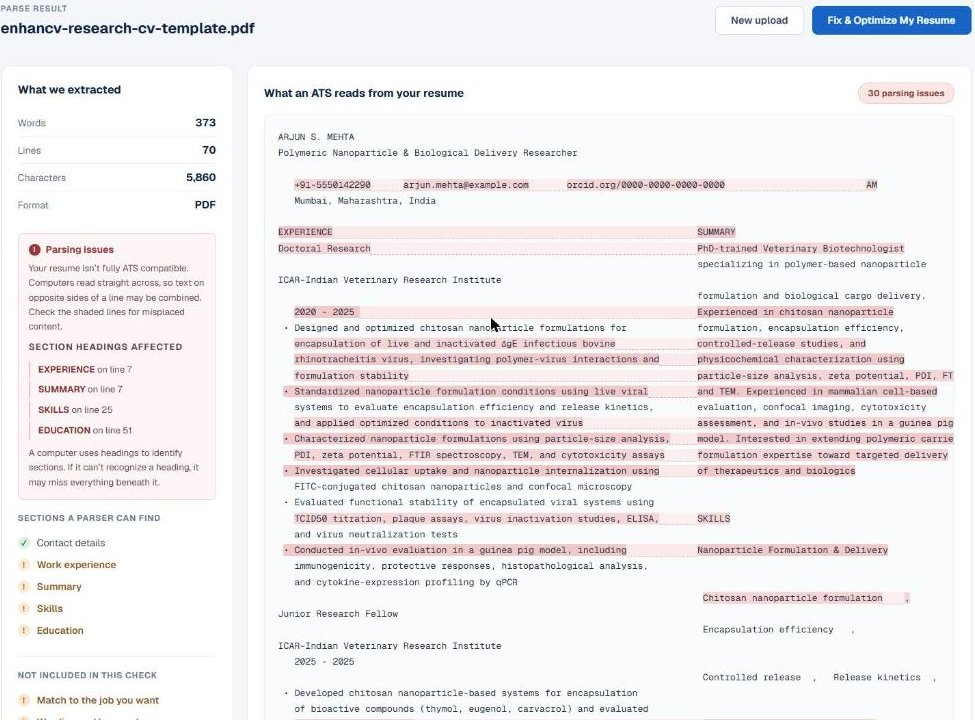
Enhancv 30 parsing issues
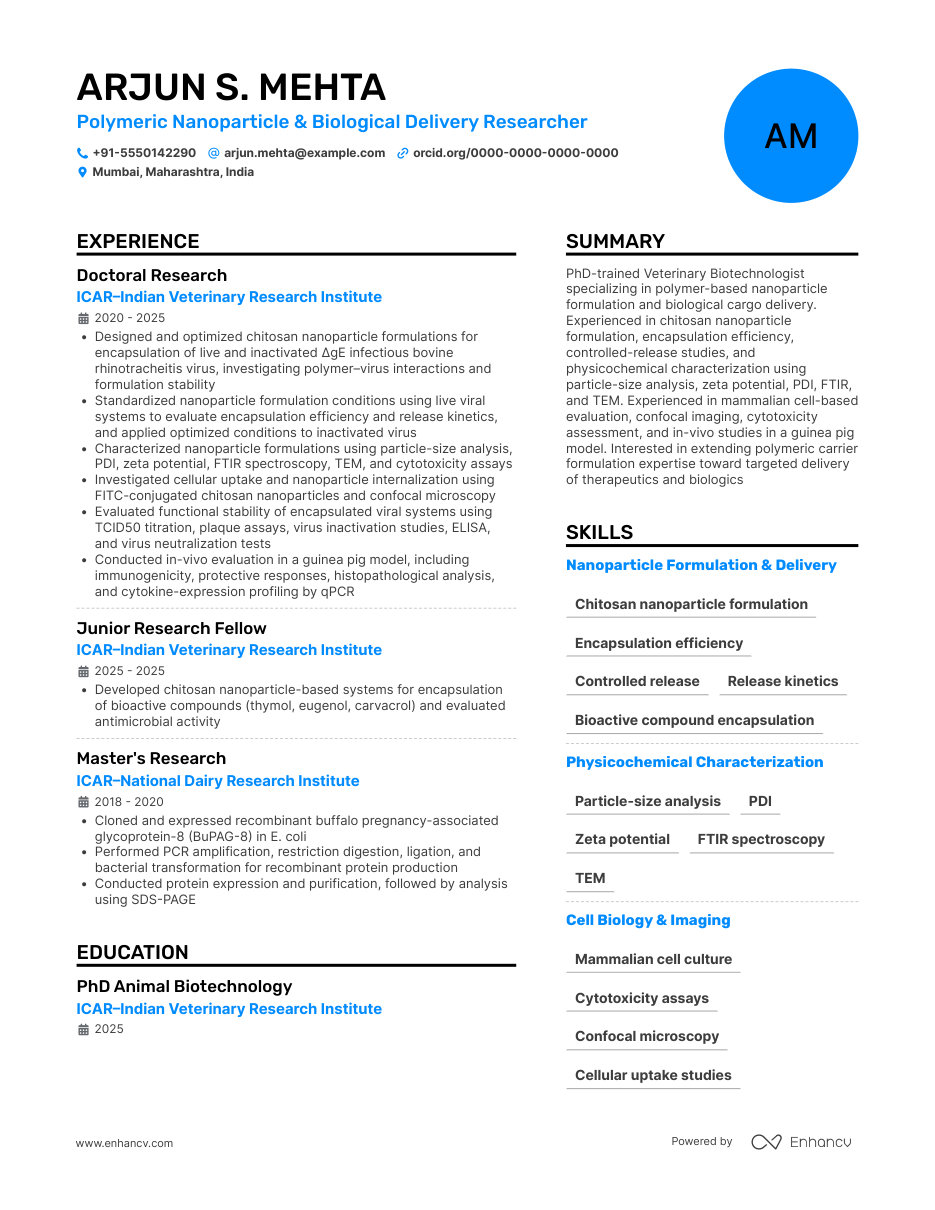
Enhancv's default template, two columns.
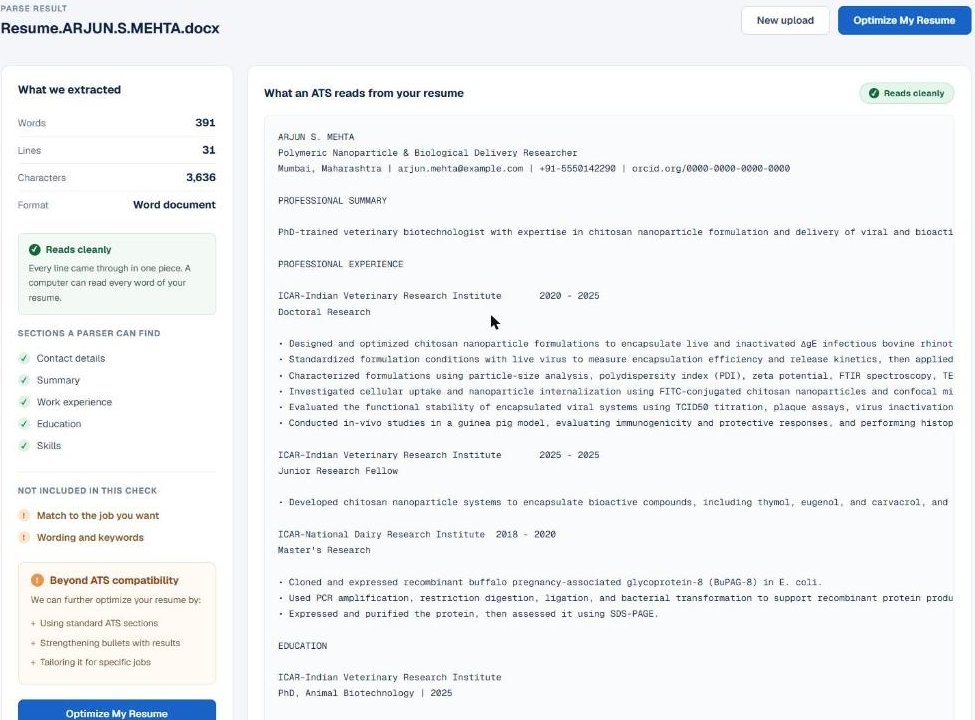
Resume Optimizer Pro 0 parsing issues
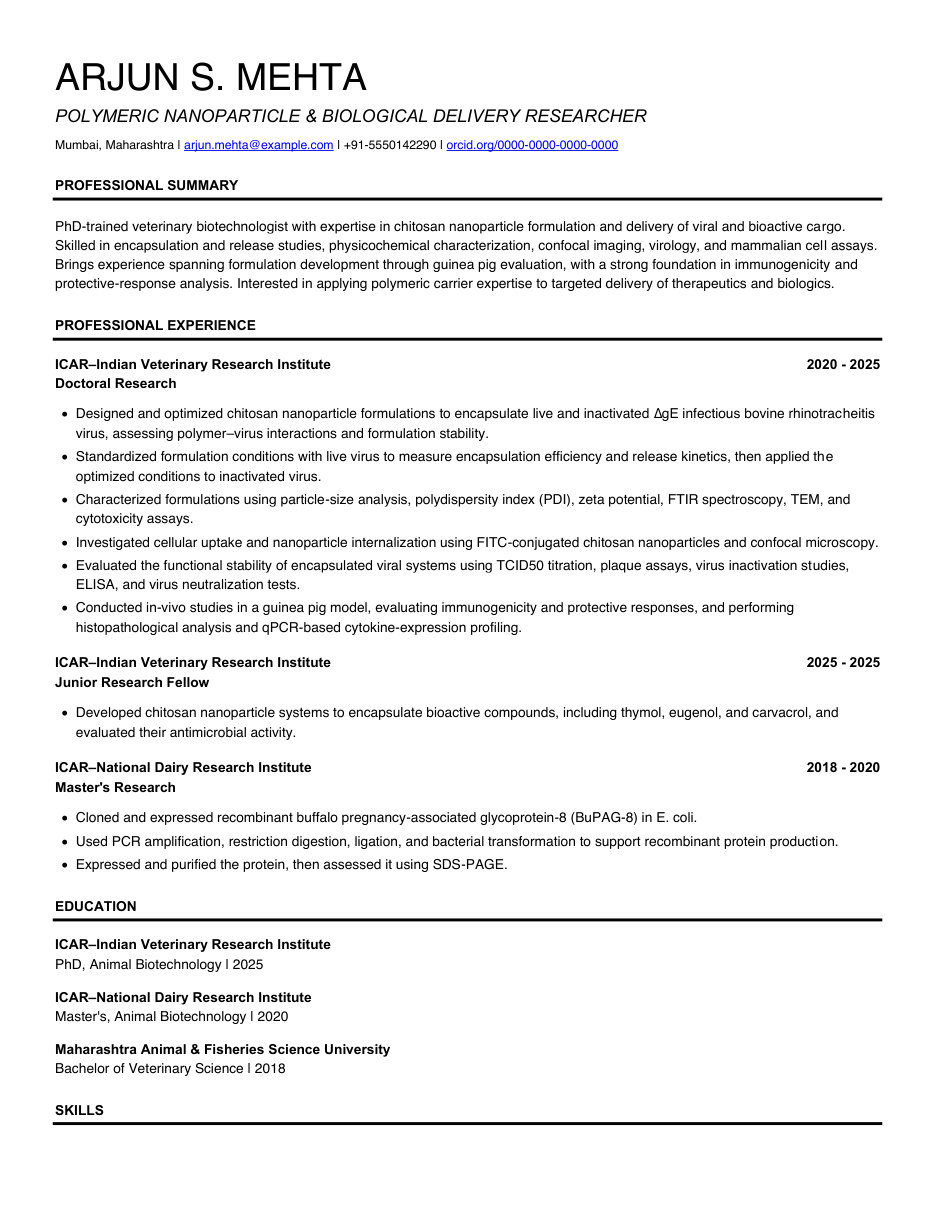
Resume Optimizer Pro's default template, one column.
Resume Optimizer Pro: 30 parsing issues, up from 19 in the original Canva file. The template places Summary and Skills in a right column beside Experience, so a parser reads "EXPERIENCE SUMMARY" as one line and fuses research bullets with sentences from the summary. All four section headings were affected. The export also adds "www.enhancv.com Powered by" as text on each page.
Our optimizer: we ran the original Canva file through Resume Optimizer Pro with its default template and no job description, then checked the Word file it produced. Result: 0 parsing issues. Every line came through in one piece, and Contact details, Summary, Work experience, Education, and Skills were all found under standard headings.
Two caveats. Our optimizer also edits wording, so the text differs slightly from the Enhancv version; the layout is what this test measures. And we graded our own file with our own checker, which is why both files are in the download list above: run them through any parser you trust.
Why the two checkers disagree
The two tools answer different questions. Enhancv's preview shows a cleaned up version of your resume: words rejoined, dates reformatted, sections reordered, and in our tests, details added that were not in the file. That is useful for building a new resume in its editor. It does not show what a parser sees in the file you are about to upload.
Our checker shows the raw text a parser extracts, line by line, and shades every line where two parts of the page merged. Nothing is repaired before you see it, so if your name is split across the summary, you see that.
One honest limit: applicant tracking systems differ, and some handle columns better than others. Neither checker can tell you which ATS an employer uses. The safe assumption: if plain text extraction scrambles your resume, some ATS will too.
What to do if your resume parses like these
- Raw text, not a preview. Look for your name, headings, and job titles on lines of their own.
- Sidebar content in the main column. Skills, education, and contact details are the usual casualties.
- Standard headings. Work Experience, Education, and Skills are the ones every parser looks for.
- A rebuilt file. Our optimizer rebuilds the layout into an ATS-safe Word file and fixes these issues for you.
For pricing and templates, see our Resume Optimizer Pro vs Enhancv comparison.
Frequently asked questions
Related Articles
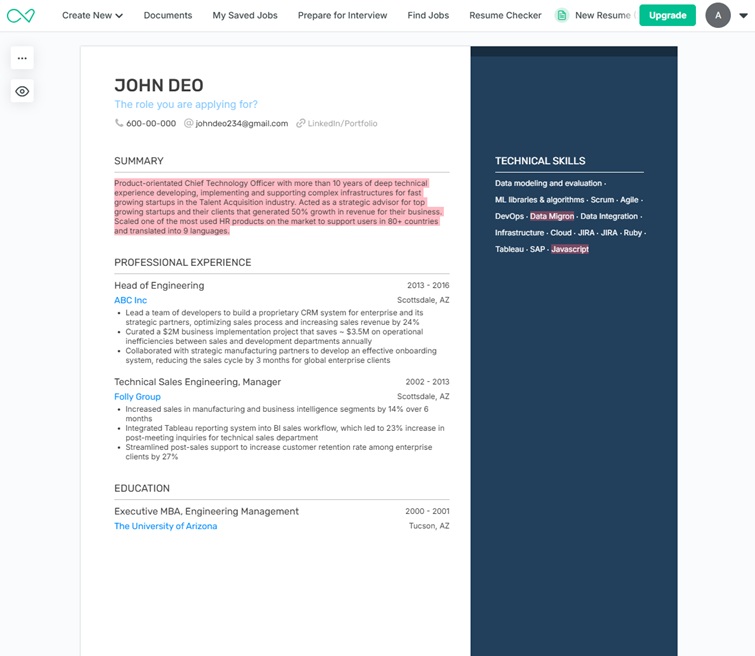
Resume Optimizer Pro vs Enhancv: Visual Builder vs ATS-First Optimizer
Our reproducible test: Enhancv's default template produced 30 parsing issues. Pricing breakdown, when visual design is d...
Read More
Enhancv Pricing & Review 2026: Cost, Free Plan Limits + Alternative
Enhancv costs $39/mo, or $16.50/mo on the 6-month plan (read Oct 2026), and the free plan lasts 7 days. Real limits, rev...
Read More
ATS Resume Checker Tools Compared (2026): Pricing & Limits
Compare Resume Optimizer Pro, Jobscan, ResumeWorded, Enhancv, and Zety on pricing, free tiers, and what each ATS checker...
Read More